Statement of Account Template (Customer Statement)
List the invoices, payments and credit notes to get a customer statement with a running balance, the overdue amount and an ageing summary, ready to print or save as PDF.
This statement of account template turns a list of invoices, payments and credit notes into a customer statement. Enter each entry with its date and amount. The tool sorts them by date, keeps a running balance, shows the balance due and splits it into an ageing summary: not yet due, and 1 to 30, 31 to 60, 61 to 90 and over 90 days past due. Print it or save it as a PDF.
A statement of account shows what a customer owes you at one date. A seller sends one when a customer has several open invoices. It is not an invoice, and it is not a bank statement.
The tool runs in your browser. There is no account and nothing you type is uploaded.
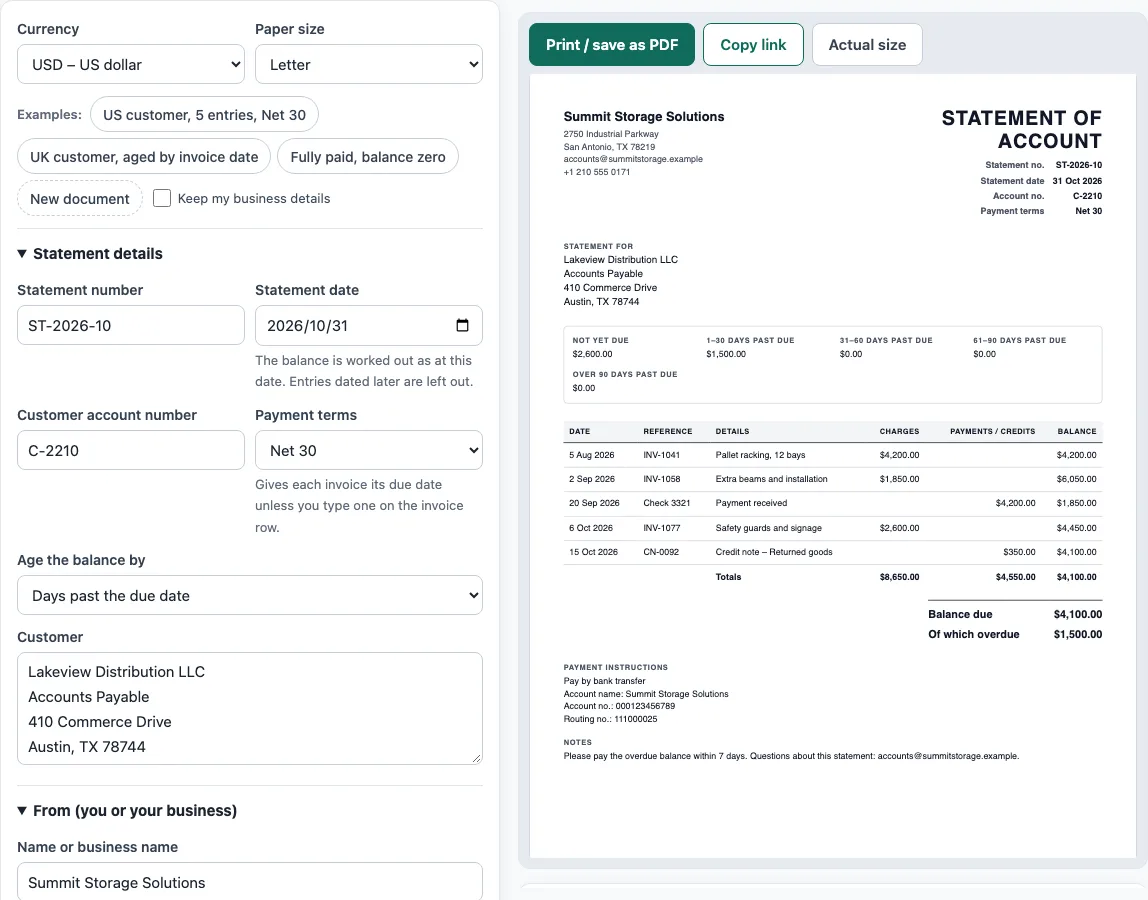
How to use the Statement of Account Template
- Above the form, pick a Currency and a Paper size. To see a finished statement first, click one of the Examples buttons: US customer, 5 entries, Net 30, UK customer, aged by invoice date, or Fully paid, balance zero.
- Under Statement details, enter the Statement number and the Statement date. The balance is worked out as at that date. Enter the Customer account number, choose the Payment terms, and choose whether to Age the balance by days past the due date or days since the invoice date. Fill in Customer with the name and address.
- In From (you or your business), enter your Name or business name, Address, Email, Phone and Tax ID / VAT number. An optional logo can be uploaded.
- In Invoices, payments and credits, click Add item for each entry. Pick the Type: Invoice (adds to the balance), Payment received, or Credit note. Enter the Date, the Number or reference, the Description and the Amount as a positive number. For an invoice, type a Due date, or leave it empty to use the payment terms.
- Check the preview, the Totals panel and any warnings, then click Print / save as PDF (choose Save as PDF in the print dialog) or Copy link.
How is the balance on a statement of account calculated?
The balance due is the invoices minus the payments and credit notes, for entries dated on or before the statement date. Take the first example. Three invoices add up to 4,200 + 1,850 + 2,600 = 8,650. A payment of 4,200 and a credit note of 350 add up to 4,550. The balance due is 8,650 − 4,550 = 4,100.
The running balance in the last column shows the balance after each entry in date order, so the customer can follow how it got to 4,100. Entries dated after the statement date are left out, and the tool tells you how many it left out.
How does the ageing summary work?
Ageing sorts the money still owed by how late it is. The tool applies the payments and credit notes to the oldest invoice first. In the example, the 4,550 clears the first invoice (4,200) and 350 of the second, which leaves 1,500 owing on the second invoice and the whole of the third, 2,600.
With Net 30 terms the second invoice, dated 2 September, was due on 2 October. At the statement date of 31 October it is 29 days past due, so its 1,500 is in the 1–30 days past due bucket. The third invoice, dated 6 October, is due on 5 November and is not yet due. The summary reads 2,600 not yet due and 1,500 at 1–30 days past due, which is 4,100 in total.
Some businesses age by the invoice date instead. Choose Days since the invoice date and the buckets become 0–30, 31–60, 61–90 and over 90 days old. The balance is the same either way. Only the grouping changes.
What is the difference between a statement of account and an invoice?
An invoice asks for payment of one sale. A statement of account lists everything the customer owes at one date: the open invoices, the payments received and the credit notes. It is a reminder and a reconciliation tool. Customers often use the statement to check their own records, so put the invoice numbers on every invoice row.
If a customer disputes an item, leave the line in and say so in Notes, so the statement still agrees with your ledger.
Worked examples
| Input | Result |
|---|---|
| 5 entries in USD as at 31 Oct 2026 | Balance due $4,100.00, overdue $1,500.00 |
| 5 entries in GBP as at 31 Oct 2026 | Balance due £2,774.25, overdue £1,587.00 |
| 2 entries in USD as at 30 Nov 2026 | Balance due $0.00, overdue $0.00 |
| 1 entries in JPY as at 31 Oct 2026 | Balance due ¥120,000, overdue ¥120,000 |
Calculated by the tool above with these values.
Frequently asked questions
Is the statement of account template really free?
Yes. The tool is free, and you do not need an account or sign-up to make a statement.
Can I use it as a statement of account example for customers?
Yes. Click an example button to load a finished statement, then replace the details with your own. The first example is a US customer, the second a UK customer aged by invoice date.
Where do payments and credit notes go?
Add each as its own entry. Choose Payment received or Credit note as the Type, and enter the amount as a positive number. The tool subtracts it from the balance and shows it in the Payments / credits column.
How do I include a balance brought forward?
Add it as an Invoice entry dated the day of the previous statement, with a Number or reference such as Balance b/f. Give it a Due date if it has one. It then ages like any other invoice.
What if the customer has overpaid?
If the payments and credit notes are more than the invoices, the balance is negative, and the tool warns you that the customer is in credit. The statement then shows the credit balance.
Is my information sent to a server?
No. Everything runs in your browser and nothing you type is uploaded. The draft is saved in your browser only, and nothing is stored on a server.
Related tools
- Invoice generator — invoices with tax, discounts, shipping, payments and balance due.
- Invoice due date calculator — due dates for Net 30, EOM and 2/10 net 30 terms.
- Invoice number generator — a numbering format and the next invoice numbers.
- Hourly invoice template — hours times a rate, with billing blocks and expenses.
- Rent receipt template — a landlord’s receipt for rent, with the rent period and any balance.