Free Shipping Label Generator (Address Labels)
Type the sender, recipient and package details to print address labels for every box in the shipment.
The Shipping Label Generator is a free tool that creates printable address labels for boxes, pallets and envelopes. You enter the recipient, your return address, the package details and a label size, then print the result or save it as a PDF. It runs in your browser with no account or sign-up, and nothing you type is uploaded.
Use it for your own deliveries, a courier you have booked separately, freight shipments or internal transfers. It does not buy postage or create carrier labels with postage and tracking barcodes. Those must be created and paid for through the carrier or a shipping service. If you need to create a shipping label free of charge for the address and handling side of a parcel, this tool covers that part.
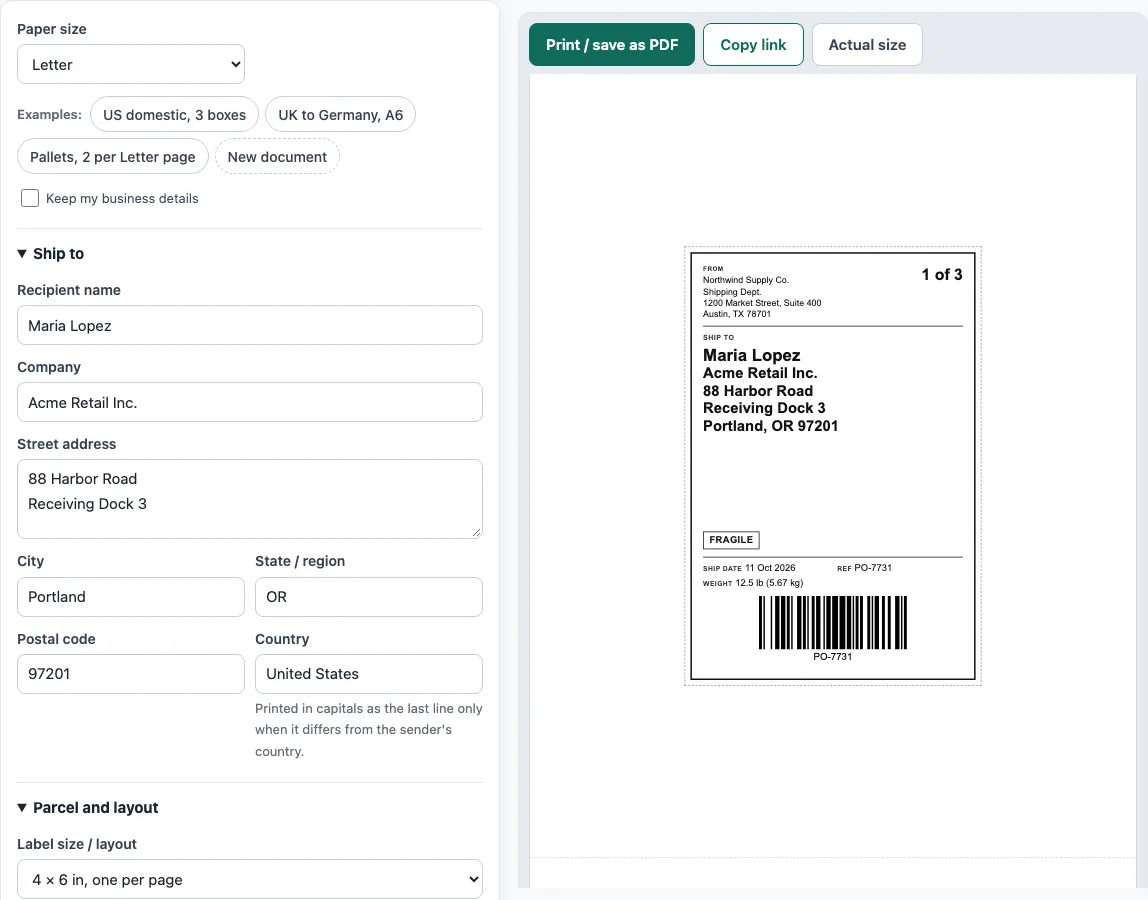
How to use the Shipping Label Generator
Work through the sections from top to bottom. The live preview updates as you type.
- In the Ship to section, fill in Recipient name, Company, Street address, City, State / region, Postal code and Country.
- In the From (return address) section, enter your own Name, Company, Street address, City, State / region, Postal code and Country. A return address lets the parcel come back if it cannot be delivered.
- In Parcel and layout, choose a Label size / layout: 4 × 6 in, A6 105 × 148 mm, or one of the two sheet layouts.
- Set Number of packages (1 to 99). You get one label per package, numbered 1 of N, 2 of N, and so on.
- Enter the Ship date, Weight per package and Weight unit, plus a Reference / order number if you use one.
- Tick Add a Code 128 barcode of the reference only if you want it for your own scanners.
- In Handling, notes and size, add a Service / notes line and tick Fragile, This side up, Keep dry or Heavy where they apply. Enter Length, Width, Height and a Size unit, or leave all three empty.
- Read the warnings under the preview and correct anything flagged.
- Click Print / save as PDF. In the print dialog, choose the page size that matches your label size.
What does a shipping label need to show?
A shipping label shows where a package comes from and where it is going. It carries the sender’s return address, the recipient’s address and, often, the package count, weight, reference or order number and handling marks. The carrier or warehouse uses the recipient address to route the parcel, and the return address to send it back if delivery fails.
For US addresses, the format is name, company, street address, then city, state as a two-letter abbreviation and ZIP code on the last line. For international mail, write the country name in capital letters as the last line. The tool follows this rule: the country is printed in capitals only when it differs from the sender’s country. A postal code is also required, and the tool warns you when it is missing because carriers and sorting machines depend on it.
Handling marks such as “Fragile”, “This side up” or “Keep dry” help people handle the parcel correctly, but they do not replace the carrier’s packaging rules. A Code 128 barcode of your reference can be scanned in your own warehouse. It is not a carrier tracking barcode.
How do multi-box and pallet shipments get labelled?
Each package needs its own label, so a shipment of several boxes needs several labels. Number them 1 of 3, 2 of 3 and 3 of 3, and use the same reference on each one. This lets the recipient confirm that all packages have arrived. The tool creates this numbering automatically when you set Number of packages.
Pallets follow the same logic on a larger scale. Put a label on at least two sides of the pallet so it can be read from more than one position. For small labels, a sheet layout with two or four labels per page saves paper. Choose the page size in the print dialog to match. The 4 × 6 in and A6 layouts print one label per page.
Common sizes include 4 × 6 inches, the usual thermal shipping label, and A6 at 105 × 148 mm. Standard letter or A4 sheets can hold several smaller labels.
Sources
- USPS Publication 28, Postal Addressing Standards — US address lines and the country name in capitals on the last line for international mail.
- Label sizes: 4 × 6 in thermal labels; A6 = 105 × 148 mm (ISO 216).
- The warehouse barcode is Code 128 (same encoder as our barcode tools, scan-tested with the open-source decoder zxing-cpp).
Worked examples
| Input | Result |
|---|---|
| 3 labels, 4 × 6 in, one per page | 3 pages, 17.01 kg (37.5 lb) in total |
| 2 labels, A6 105 × 148 mm, one per page | 2 pages, 36.8 kg (81.13 lb) in total |
| 4 labels, Sheet: 2 labels per page | 2 pages, 816.47 kg (1,800 lb) in total |
| 10 labels, Sheet: 4 labels per page | 3 pages |
Calculated by the tool above with these values.
Frequently asked questions
Is the shipping label generator free to use?
Yes. It is free, requires no account or sign-up, and runs in your browser. Nothing you type is uploaded, and the draft is saved only in your browser.
Does this tool buy postage or create USPS, UPS or FedEx labels?
No. The tool makes address labels for boxes, pallets and envelopes. Carrier labels with postage and tracking barcodes must be created and paid for through the carrier or a shipping service.
Why does the country name appear in capitals on my label?
The country is printed in capitals as the last line only when it differs from your own country. This is the standard format for international mail.
Why do I need to choose a page size before printing?
The print dialog has to match the label size you picked. For 4 × 6 in and A6, choose that page size and print one label per page. The sheet layouts use the paper size selected above the form, either A4 or Letter.
What is the barcode for, and can carriers scan it?
The Code 128 barcode encodes your reference number so you can scan it in your own warehouse. It is not a carrier tracking barcode, so carriers will not use it to track the parcel.
What happens to the addresses I enter?
They stay in your browser. The tool does not upload them, and the draft is saved only on your device until you clear it.
Related tools
- Packing list template — cartons, weights and CBM, package by package.
- Bill of lading template — a straight bill of lading for truck shipments.
- Delivery note template — what was delivered, for the customer to sign.
- Commercial invoice template — the customs invoice for an international shipment.
- Invoice generator — invoices with tax, discounts, shipping, payments and balance due.
- Purchase order template — a purchase order to send to your supplier.