Sales Order Template (Sales Order Form)
Enter the customer, the items and the terms to confirm an order with totals, deposit and balance due.
A sales order template is a ready-made form that a seller fills in to confirm a customer’s order: what will be supplied, in what quantities, at what prices, and on what delivery and payment terms. This free sales order form runs in your browser. You enter your details, the customer’s details and the items, and the document builds as you type. No account or sign-up is needed, and nothing you type is uploaded.
Use it as a sales order sheet for your own orders, or load one of the examples to see a sample sales order form before you enter your own numbers. A live preview shows the finished document on A4 or Letter paper.
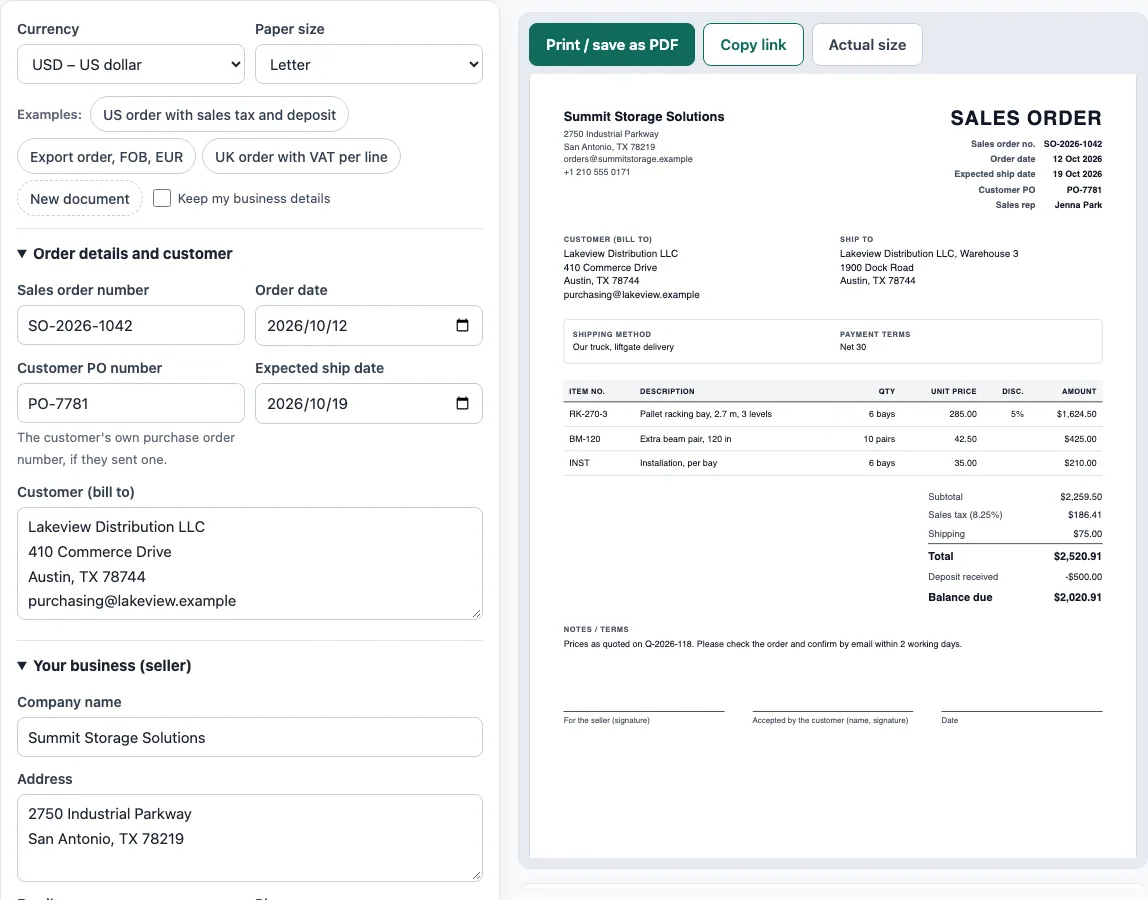
How to use the Sales Order Template
- Choose a currency and a paper size (A4 or Letter) above the form.
- Open Order details and customer. Enter the Sales order number, Order date and Expected ship date. Add the customer’s PO number if there is one. Then type the customer’s name, address and email in Customer (bill to).
- Open Your business (seller) and enter your Company name, Address, Email, Phone, Tax ID / VAT number and, if you like, the Sales rep.
- Open Shipping and payment terms. Enter the Ship to address or tick the box to use the bill-to address, then the Shipping method, Payment terms and, for export orders, Shipping terms (Incoterms 2020) with a Named place.
- Open Items ordered and click Add item for each line. Fill in Item no., Description, Qty, Unit, Unit price, Discount % and Tax %.
- Open Discount, tax, shipping and deposit. Enter any Order discount, the Tax name and Tax rate (%), the Shipping amount and any Deposit received.
- Open Notes and customer acceptance. Add Notes / terms and, if you want the customer to confirm in writing, a name for the acceptance line.
- Check the Totals panel, any warnings and “How the totals were calculated”.
- Click Print / save as PDF, or Copy link to share it.
The Examples: buttons load a sample sales order and New document clears the form; tick Keep my business details to keep your company details. An optional logo (PNG, JPG or SVG up to 300 KB) stays in this browser only.
What is a sales order and what does it contain?
A sales order is a document a seller issues to confirm a customer’s order. It states what will be supplied, in what quantities, at what prices, and the delivery and payment terms.
The seller makes the sales order, usually after receiving the customer’s purchase order or accepting a quotation. A typical sales order shows the title “Sales order”, a sales order number, the order date, the customer’s PO number if there is one, the seller’s details, the bill-to and ship-to addresses, the expected ship date, the shipping method and payment terms. Each line shows the item number, description, quantity, unit price, discount and amount. The document ends with the subtotal, tax, shipping, order total, any deposit received and the balance due.
What is the difference between a sales order and an invoice?
A sales order confirms an order before delivery, while an invoice asks for payment after delivery or at delivery. The sales order says what the seller agrees to supply. The invoice says what the customer now owes.
Where does a sales order fit in a sale?
A sale usually passes through five documents in this order:
- Quotation: the seller’s offer.
- Purchase order: the buyer’s order.
- Sales order: the seller’s confirmation.
- Delivery note or packing list: the goods that were shipped.
- Invoice: the request for payment.
How are sales order totals calculated?
Each line is quantity times unit price, less any line discount. The subtotal is the sum of the lines. Tax is then applied to the taxable amount, shipping is added, and any deposit already paid is taken off to give the balance due.
Here is a worked example. Six racking bays at 285.00 with 5 % off come to 1,624.50. Ten beam pairs at 42.50 come to 425.00. Installation at 6 × 35.00 comes to 210.00. The subtotal is 2,259.50. Sales tax at 8.25 % on that subtotal is 186.41. With shipping of 75.00, the order total is 2,520.91. After a deposit of 500.00, the balance due is 2,020.91. In this example, tax applies to the goods and not to shipping.
How should I number a sales order?
Many sellers use their own sequence for sales order numbers, such as SO-2026-1042. The customer’s PO number should appear on the sales order, the delivery note and the invoice, so the customer can match all three to the same order.
When should a sales order include a customer signature line?
Add a customer acceptance signature line when you want the customer to confirm the order details in writing. The name printed above the signature line is optional.
Sources
- Texas Comptroller, sales tax rates — the 8.25 % combined rate (6.25 % state + 2 % local) used in the US example; an example, not tax advice.
- ISO 4217 currency list (list one, published 17 September 2026) — currency codes and decimals for all 36 offered currencies.
- ICC Incoterms® 2020 — the 11 three-letter shipping terms offered in the form (names only; the rules’ texts are the ICC’s).
Worked examples
| Input | Result |
|---|---|
| 3 items in USD, Sales tax | Order total $2,520.91, balance due $2,020.91 after the deposit |
| 3 items in EUR, no tax | Order total €8,408.40, balance due €5,885.88 after the deposit |
| 2 items in GBP, VAT | Order total £492.80 |
| 1 items in CAD, no tax | Order total CA$1,139.94 |
Calculated by the tool above with these values.
Frequently asked questions
Is a sales order form the same as a sales order template?
Yes, in everyday use the two terms mean the same thing. A sales order form or template is the layout you fill in to create a sales order.
Who creates a sales order?
The seller creates the sales order to confirm what it will supply to the customer. It is usually made after the customer’s purchase order is received or a quotation is accepted.
Can I use this sales order sample for my own business?
Yes. Documents made here may be used for business with no attribution. Replace the example details with your own before you send anything.
Does the tool store the details I enter?
The draft is saved in your browser as you type, so it is still there when you reopen the page. Nothing is stored on a server, and nothing you type is uploaded.
Do I need to create an account?
No. The tool is free, and there is no account or sign-up.
Can I take a deposit on a sales order?
Yes. Type the amount in Deposit received. The sales order then shows the order total, the deposit and the balance due, and warns you if the deposit is larger than the total.
Related tools
- Quotation generator — a price quote with a validity date and an acceptance line.
- Purchase order template — a purchase order to send to your supplier.
- Invoice generator — invoices with tax, discounts, shipping, payments and balance due.
- Delivery note template — what was delivered, for the customer to sign.
- Price list template — products and prices by category, with an optional tax-included column.
- Invoice due date calculator — due dates for Net 30, EOM and 2/10 net 30 terms.
- Packing list template — cartons, weights and CBM, package by package.
- Bill of sale template — a written record of the sale of a vehicle, boat or other item.