Request for Quotation Template (RFQ Form)
List what you need and when; the RFQ leaves the price and lead-time columns empty for each supplier to fill in.
A request for quotation (RFQ) template is a ready-made form that a buyer sends to one or more suppliers to ask for prices on specified goods or services, in stated quantities, by a set deadline. This free RFQ template tool lets you fill in the details and print or save a finished request as a PDF. It runs in your browser, needs no account or sign-up, and nothing you type is uploaded.
You can start with a blank request for quotation form or click an example to see a filled-in request for quote example. A live preview shows the document on a paper-sized sheet as you type, so you can check the layout before you print it.
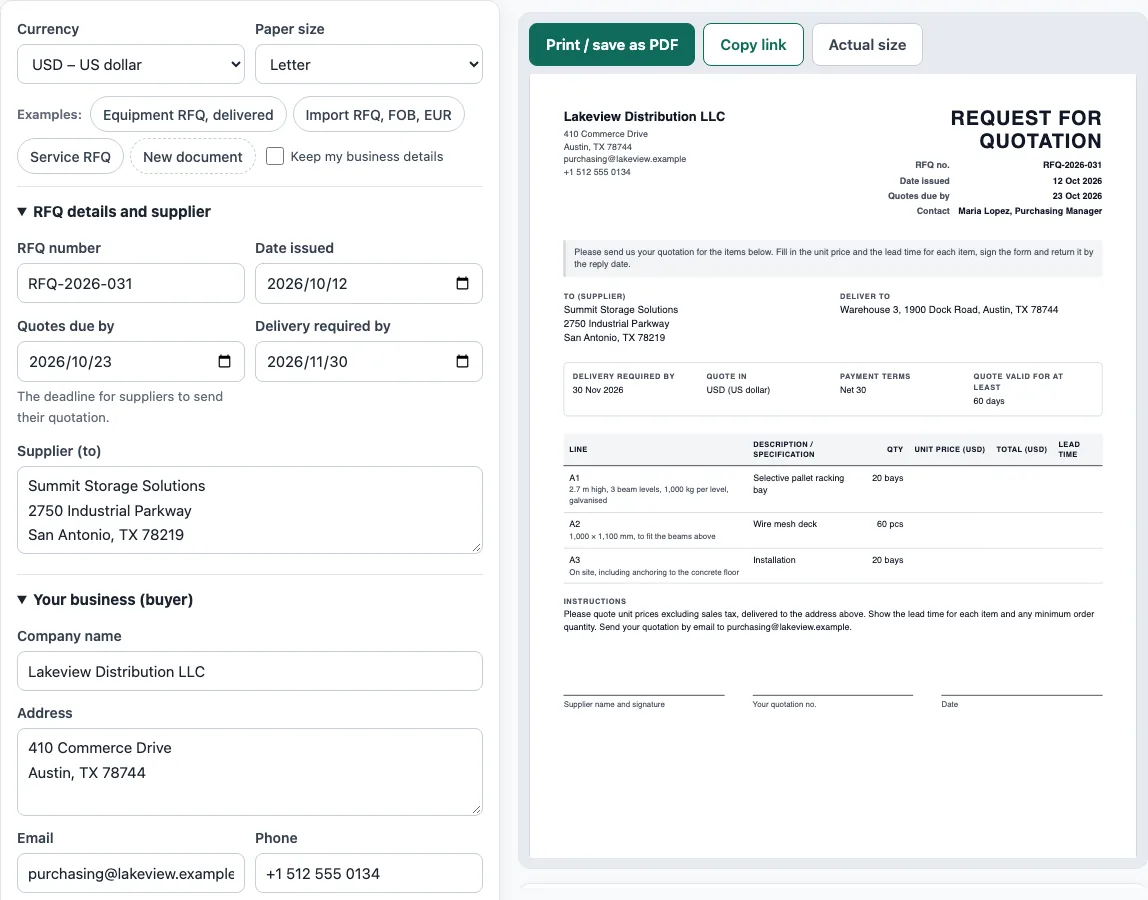
How to use the RFQ Template
- Above the form, pick the currency suppliers should quote in and a paper size (A4 or Letter).
- In RFQ details and supplier, enter the RFQ number, Date issued, Quotes due by and Delivery required by. Include a Supplier (to) name if you are sending it to one supplier. Leave it empty for a version you can send to several suppliers.
- In Your business (buyer), enter your Company name, Address, Email, Phone, and Contact person.
- In Delivery and commercial terms, enter Deliver to, Payment terms wanted, and Quote valid for at least (days). For international purchases, you can also add Shipping terms wanted (Incoterms 2020) and a Named place.
- In Items to quote, click Add item for each row. Complete Description, Specification, Qty, and Unit.
- In Instructions to suppliers, describe the reply format you expect from suppliers.
- Read the warnings under the preview and fix anything they flag.
- Click Print / save as PDF and choose Save as PDF in the browser’s print dialog. Or click Copy link to copy a link that holds the whole document.
Your draft is saved in this browser as you type, so it is still there when you reopen the page. Choose Fit to width if the preview is hard to read, or New document to empty the form. Check Keep my business details first if you want your company details kept for the next document.
What is a request for quotation?
Buyers send a request for quotation to suppliers, asking them to price specified goods or services by a set deadline. Also called a request for quote, this document starts a purchase when the buyer already knows exactly what it needs.
An RFQ usually shows the buyer’s company and contact, an RFQ number, the date issued, and the date quotes are due. Beyond that, it states the delivery date and place wanted, lists each item with its description, specification, quantity, and unit, and sets out the commercial terms: payment terms, shipping terms, and how long the quote must stay valid. Reply instructions come last, alongside empty columns for the supplier’s unit prices and lead times.
When should you send an RFQ instead of an RFP or RFI?
Send an RFQ when you know exactly what you need and price is the main deciding factor. Choose a request for proposal (RFP) instead when you describe a problem and want suppliers to propose solutions. A request for information (RFI) only gathers information about suppliers and does not ask for prices.
What should a request for quote example include?
Every item should be stated clearly in a useful request for quote example, so each supplier quotes the same thing. Each line needs a precise description and specification, a quantity above zero, and a unit. Include a clear reply deadline and a validity period so quotes can be compared fairly.
Timing matters too. In a worked example, a request issued on 12 October 2026 with quotes due on 23 October 2026 gives suppliers 11 days to reply. If delivery is required by 30 November 2026, that is 38 days after the quote deadline. Tight reply windows often lead to fewer quotes, so leave enough time.
Why send the same RFQ to several suppliers?
When several suppliers receive the same RFQ with identical specifications and deadline, you can compare quotes line by line. Since every supplier prices the same items, gaps in price and lead time stand out. Each supplier replies with a quotation, and the chosen one usually then receives a purchase order.
Sources
- ICC Incoterms® 2020: the 11 three-letter shipping terms offered in the form.
- ISO 4217 currency list (list one, published 17 September 2026): the currency suppliers are asked to quote in.
- Day counts are calendar arithmetic (Gregorian calendar, leap years included); there are no other data on this page.
Worked examples
| Input | Result |
|---|---|
| 3 lines, issued 12 Oct 2026, quotes due 23 Oct 2026 | 11 days to reply, then 38 days until the required delivery |
| 2 lines, issued 12 Oct 2026, quotes due 30 Oct 2026 | 18 days to reply, then 77 days until the required delivery |
| 2 lines, issued 12 Oct 2026, quotes due 19 Oct 2026 | 7 days for suppliers to reply |
Calculated by the tool above with these values.
Frequently asked questions
Is this request for quotation template free to use?
Yes. The tool is free, requires no account or sign-up, and runs in your browser. Nothing you type is uploaded or stored on a server.
Can I use the document for my business?
Yes. Documents made with this tool may be used for business with no attribution.
Do I need to fill in a supplier name?
No. Leave the Supplier (to) box empty to print an RFQ that you can send to several suppliers. Add a name when you are sending it to one supplier.
Why does the tool show a warning about my reply deadline?
The tool warns when suppliers have fewer than 3 days to reply, because a short deadline often means fewer quotes. It also warns if the reply date is before the date issued, or if the delivery date is before the reply date.
Can I add my company logo?
Yes, optionally. You can upload a PNG, JPG, or SVG file up to 300 KB. The logo stays in your browser only and is not part of the share link.
Can suppliers write their prices on the printed RFQ?
Yes. The printed form has empty Unit price, Total and Lead time columns for each line, plus lines for the supplier’s name, signature, quotation number and date.
Related tools
- Quotation generator: gives a price quote with a validity date and an acceptance line.
- Purchase order template: this is the purchase order you send to your supplier.
- Purchase requisition template: an internal purchase request, checked against the budget.
- Price list template: products and prices by category, with an optional tax-included column.
- Sales order template: the seller’s order confirmation, showing the deposit and balance due.
- Proforma invoice template: pre-shipment invoice that carries Incoterms, ports and HS codes.