Rent Receipt Template (Free Rent Receipt Maker)
Enter the tenant, the property, the rent period and the amount received to get a rent receipt you can print or save as a PDF, with any balance shown.
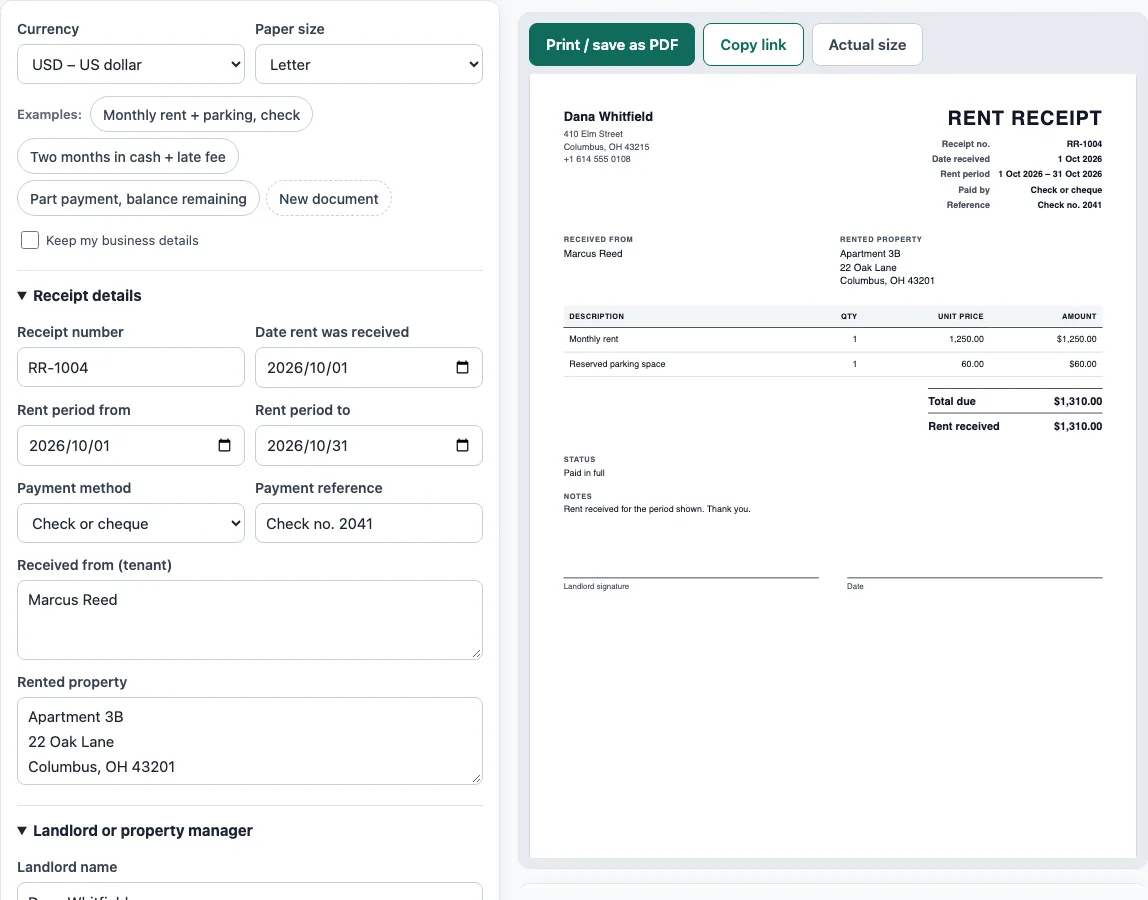
This rent receipt template makes a receipt for rent a landlord has received. You enter the tenant, the property, the rent period and the amount, and the tool builds the receipt in a live preview with the date, the payment method and a signature line. If only part of the rent was paid, the receipt shows the balance remaining. Print it or save it as a PDF.
It suits private landlords, property managers and tenants who want a record of what was paid. Each charge has its own line, so one receipt can cover rent, parking or a late fee, and several months at once.
The tool runs in your browser. There is no account and nothing you type is uploaded. Your draft stays saved in this browser, so it is still there next month.
How to use the Rent Receipt Template
- Above the form, pick a Currency and a Paper size. To see a finished receipt first, click one of the Examples buttons: Monthly rent + parking, check, Two months in cash + late fee, or Part payment, balance remaining.
- Under Receipt details, enter the Receipt number (optional), the Date rent was received, and the Rent period from and Rent period to dates. Choose the Payment method and type a Payment reference, such as a check number. Fill in Received from (tenant) and Rented property.
- In Landlord or property manager, enter the Landlord name, Address, Email and Phone.
- In What the payment covers, click Add item for each charge. Enter the Description, the Quantity and the Amount each. For two months of rent, enter 2 as the quantity and the monthly rent as the amount.
- Under Amount received, leave the box blank if the full amount was paid. Type a smaller figure for a part payment.
- Check the preview and any warnings, then click Print / save as PDF (choose Save as PDF in the print dialog) or Copy link.
Keep my business details leaves the landlord’s name and address in place when you click New document, so next month’s receipt takes seconds.
What should a rent receipt include?
A rent receipt should state who paid, who received the money, which property the rent is for, the rent period it covers, the amount, the date it was received and how it was paid. A receipt number helps when a landlord keeps many. For a check or a bank transfer, a reference ties the receipt to a line on a bank statement. The landlord’s signature confirms the payment.
Writing the rent period matters. A receipt that only says “rent received” leaves it unclear whether it covers October or the month before. Enter the period from and to, and the receipt prints it as a range, for example 1 Oct 2026 – 31 Oct 2026.
A rental receipt is the same document under another name. Use it for a room, an apartment, a house, a garage or a storage unit: describe the rented place in Rented property and the receipt reads the same.
How do you write a receipt for rent paid in cash?
Choose Cash as the Payment method, leave the Payment reference empty and make sure the landlord signs and dates the receipt. With cash there is no bank record, so the signed receipt is the tenant’s only proof. Give the tenant the original and keep a copy. Rules about receipts for cash rent differ by state and country, so check the landlord and tenant rules where the property is.
How do you show a partial rent payment?
Say the rent is 1,250 and the tenant pays 600 now. Enter 1,250 as the rent line and type 600 in Amount received. The receipt shows the total due of 1,250, the rent received of 600 and a balance remaining of 650 (1,250 − 600). The Notes box is a good place to record when the balance is due. When the remaining 650 arrives, make a second receipt.
To bill a part month, set the quantity and amount each yourself. A tenant who moves in with 12 days left in a 31-day month at a monthly rent of 1,240 owes 1,240 ÷ 31 = 40 a day, so enter 12 as the quantity and 40 as the amount each for 480. Some leases pro-rate by a 30-day month or a different rule, so use the method your lease states.
Worked examples
| Input | Result |
|---|---|
| 2 charges in USD | Total $1,310.00, paid in full |
| 2 charges in GBP | Total £1,585.00, paid in full |
| 1 charges in USD | Total $1,250.00, received $600.00, balance $650.00 |
| 1 charges in JPY | Total ¥85,000, paid in full |
Calculated by the tool above with these values.
Frequently asked questions
Is the rent receipt template really free?
Yes. The tool is free, and you do not need an account or sign-up to make a receipt.
Can a tenant make their own rent receipt?
Yes, but a receipt carries weight only when the landlord signs it. Use the template to prepare the receipt and ask the landlord to sign and date it.
Can I put several months on one receipt?
Yes. Set the Quantity to the number of months and the Amount each to the monthly rent, and write the full range in Rent period from and Rent period to. The Two months in cash + late fee example shows this.
Can I add a late fee or a deposit?
Yes. Add another item with its own description and amount, such as a late fee or a parking charge. Check that your lease and local law allow the fee. This tool does not decide that.
Can I save the receipt as a Word document?
The tool prints and saves PDF. Choose Print / save as PDF, then Save as PDF in the print dialog. If you need Word, copy the details into your own document.
Is my information sent to a server?
No. Everything runs in your browser and nothing you type is uploaded. The draft is saved in your browser only, and nothing is stored on a server.
Related tools
- Invoice generator — invoices with tax, discounts, shipping, payments and balance due.
- Invoice due date calculator — due dates for Net 30, EOM and 2/10 net 30 terms.
- Bill of sale template — a written record of a sale of a vehicle, boat or other item.
- Statement of account template — a customer statement with a running balance and ageing.
- Invoice number generator — a numbering format and the next invoice numbers.
- Hourly invoice template — hours times a rate, with billing blocks and expenses.