Quotation Generator (Free Quote Maker)
Enter the customer, the items and your terms to get a ready-to-send quotation with totals and a validity date.
The Quotation Generator is a free quotation maker for writing a quote that a seller sends to a customer before a sale. You fill in your business details, the customer, line items, tax, discounts, delivery charge and payment terms, and the finished document appears in a live preview that you can print or save as a PDF.
The tool runs in your browser. There is no account and no sign-up, and nothing you type is uploaded. Your draft stays saved in this browser, so it is still there when you come back to the page.
You can use it for goods, services or a mix of both. Choose QUOTATION or QUOTE as the title, and set the currency and paper size (A4 or Letter) before you start. If you make quotes often, the option to keep your own business details lets you start each new document without retyping them.
How to use the Quotation Generator
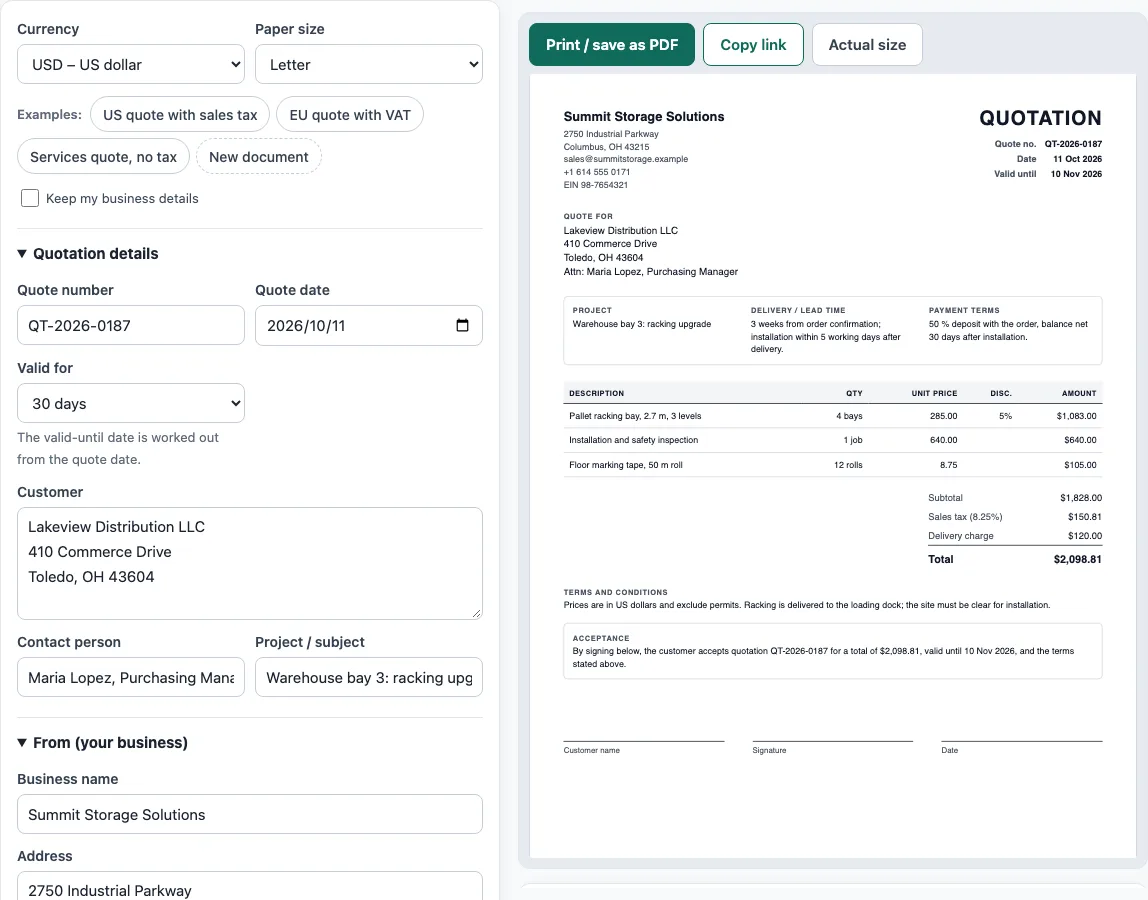
- Above the form, pick a Currency and a Paper size. To see a finished example first, click one of the Examples buttons: US quote with sales tax, EU quote with VAT, or Services quote, no tax.
- Under Document title, choose QUOTATION or QUOTE. Enter a Quote number and the Quote date.
- Under Valid for, choose 7, 14, 30, 45, 60, 90 days or Pick a date. The Valid until date is worked out from the quote date.
- In From (your business), enter Business name, Address, Email, Phone and Tax ID / VAT number. You can upload an optional logo.
- In the customer section, enter Customer, Contact person and Project / subject.
- In Items, click Add item for each line. Fill in Description, Qty, Unit, Unit price, Disc. % and Tax %. Each row can be moved up or down or removed.
- In Tax, discount and delivery charge, set the Tax name, Tax rate (%), any discount on the whole quote and its value, and the Shipping / delivery charge.
- In Terms and acceptance, add the Delivery / lead time, Payment terms and Terms and conditions / notes. Turn on the acceptance block if the customer should sign.
- Check the preview, the Totals panel and any warnings, then click Print / save as PDF (choose Save as PDF in the print dialog) or Copy link.
What is a quotation and how is it different from an estimate?
A quotation is a document a seller sends before a sale, offering to supply goods or services at stated prices and terms for a limited time. If the customer accepts, the quotation usually becomes the basis of the order or contract and of the invoice that follows.
A quote is a fixed price offer. An estimate is an approximate price that may change. Use a quote when you can price the job exactly, and an estimate when you cannot. A request for quotation (RFQ) is the buyer’s request, and the quotation is the seller’s answer to it.
A quotation is also not an invoice. No payment is due just because a quote was sent. Payment becomes due only after the customer accepts and the goods or work are delivered and invoiced.
What should a quotation include?
A quotation should show the word “Quotation” or “Quote”, a quote number, the date, and the date until which the quote is valid. It should also show the seller and customer details, and each item with its description, quantity, unit price and line total.
Most quotes also show discounts, tax, the total, the delivery time, the payment terms and a place for the customer to accept. Acceptance usually means a name, a signature and a date.
Validity matters. A validity of 30 days is common. If the prices of your materials change often, a shorter validity protects you because you are not held to an old price.
Here is one common way to work out a line. Take 3 items at 120 each, which is 360. A 10 % discount takes off 36, leaving 324. A 20 % tax on 324 is 64.80, so the line total with tax is 388.80. The How the totals were calculated panel shows the same arithmetic using your own numbers.
Sources
- HMRC VAT Notice 700, section 16 and EU VAT Directive 2006/112/EC, Article 226 — what a VAT invoice must show.
- ISO 4217 currency list (list one, published 17 September 2026) — currency codes and decimals for all 36 offered currencies.
Worked examples
| Input | Result |
|---|---|
| 3 items in USD, Sales tax | Total $2,098.81 |
| 4 items in EUR, VAT | Total €3,387.79 |
| 3 items in USD, no tax | Total $3,906.00 |
| 1 items in JPY, Consumption tax | Total ¥38,530 |
Calculated by the tool above with these values.
Frequently asked questions
Is the Quotation Generator really free?
Yes. The tool is free to use, and you do not need an account or sign-up to create a quotation.
Is my information sent to a server?
No. Everything runs in your browser and nothing you type is uploaded. The draft is saved in your browser only, and nothing is stored on a server.
Is this a quotation creator or a quote creator?
Both names describe the same thing. This free quote creator works as a quotation creator too: pick QUOTATION or QUOTE as the title at the top of the document.
What is the difference between QUOTATION and QUOTE?
Both are title options for the same kind of document. Choose whichever word your customers expect to see at the top of the page.
How do I make the valid-until date correct?
Set the Quote date first, then choose a number of days under Valid for. The Valid until date is calculated from the quote date. If the valid-until date is before the quote date, the tool shows a warning that the quote has already expired.
Can I use the quotes I make here for business?
Yes. Documents made here may be used for business with no attribution needed.
Will my draft still be there if I close the page?
Yes. The draft is saved in this browser as you type, so it is still there when you reopen the page. Your logo also stays in this browser only and is not part of the share link.
Related tools
- Invoice generator — invoices with tax, discounts, shipping, payments and balance due.
- Proforma invoice template — the pre-shipment invoice with Incoterms, ports and HS codes.
- Purchase order template — a purchase order to send to your supplier.
- Delivery note template — what was delivered, for the customer to sign.
- Commercial invoice template — the customs invoice for an international shipment.
- Packing list template — cartons, weights and CBM, package by package.
- Request for quotation template — an RFQ form suppliers fill in with prices and lead times.
- Price list template — products and prices by category, with an optional tax-included column.
- Sales order template — the seller’s order confirmation with deposit and balance due.