Purchase Requisition Template
Fill in who needs what, by when and why; the requisition adds up the estimated cost and compares it with the budget.
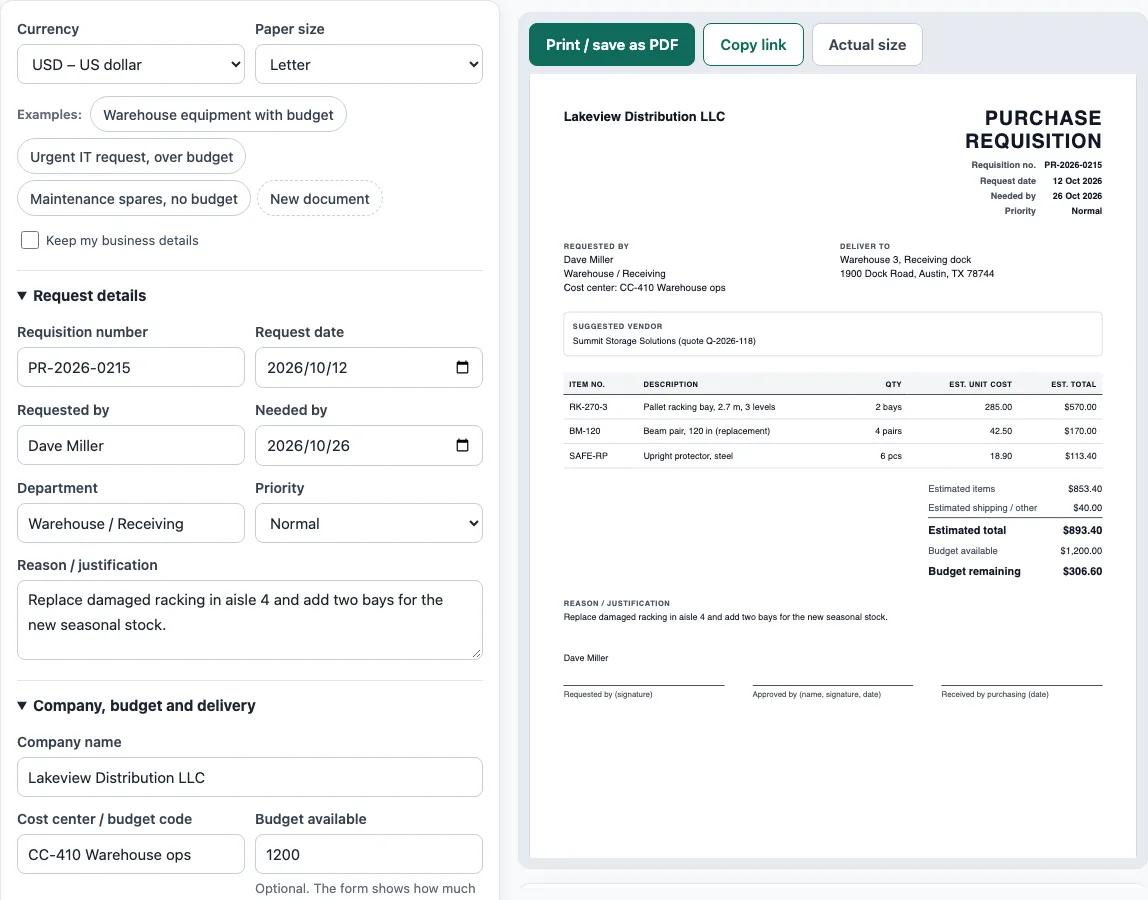
How to use the Purchase Requisition Template
- Above the form, pick a Currency and a Paper size (A4 or Letter).
- Open the Request details section. Fill in Requisition number, Request date, Requested by, Department and Needed by. Set Priority to Normal, Urgent or Low, and write the Reason / justification.
- Open Company, budget and delivery. Enter Company name, Cost center / budget code, Deliver to and, if you know one, a Suggested vendor. Budget available is optional. If you add it, the form shows how much is left, or how far the request is over.
- Open Items requested. In the line-item table, fill in Item no., Description, Qty, Unit and Estimated unit cost for each row. Click Add item for more rows, and use the row controls to move a row up or down or remove it.
- Open Shipping, approval and purchasing notes. Add Estimated shipping / other costs. Enter an Approver name if you want it printed above the approval signature line. The For purchasing use field is for the purchasing team.
- Check the live preview, the Totals panel and any warnings under it. Then click Print / save as PDF, or Copy link to share the whole document.
To start from a sample, click one of the Examples buttons. New document clears the form, and the Keep my business details checkbox keeps your company details when you do. The draft stays in this browser as you type, so it is still there when you return to the page.
What is a purchase requisition form template?
A purchase requisition form template is a standard internal form that an employee or department uses to ask the company for permission to buy something. It is not sent to a supplier. It goes to the purchasing team or a manager, who check the request before any order is placed.
What is the format of a purchase requisition form?
A typical purchase requisition form has a requisition number, the request date, the requester’s name and department, and the cost center or budget code. It also lists the date the items are needed, where they should be delivered, and the items themselves with quantities, units and estimated costs. Most forms end with the estimated total, a suggested vendor if known, the reason for the purchase, and approval signatures. The format is the same whatever the goods are, so a purchase request sample for office supplies looks much like one for machinery.
What is the difference between a purchase requisition and a purchase order?
A purchase requisition is an internal request to buy. A purchase order is the company’s order to a supplier. The order is only created after the requisition has been approved. Purchasing usually turns the approved requisition into the purchase order.
Why do companies use a purchase request form before buying?
A requisition lets the company check a purchase against the budget before money is committed. It also records who asked for what and why, and it gives an approver a chance to say yes or no. Without that step, costs can build up before anyone has checked whether there is room in the budget.
How is the estimated total on a requisition calculated?
Each line’s estimated cost is the quantity multiplied by the estimated unit cost. The line costs are added together, and any estimated shipping or other costs are added to that sum. For example, 2 racking bays at 285.00, 4 beam pairs at 42.50 and 6 protectors at 18.90 come to 853.40 for the items. With estimated shipping of 40.00, the estimated total is 893.40. Against a budget of 1,200.00, that leaves 306.60. The IT example in the tool totals 3,632.00 against a 3,000.00 budget, which is 632.00 over. The section “How the totals were calculated” under the preview shows this arithmetic with your own numbers.
Sources
- ISO 4217 currency list (list one, published 17 September 2026) — currency codes and decimals for the estimated costs.
- The form’s fields are our own summary of a typical internal requisition; there are no rates or legal values on this page.
Worked examples
| Input | Result |
|---|---|
| 3 items in USD, budget $1,200.00 | Estimated total $893.40, $306.60 of the budget left |
| 3 items in EUR, budget €3,000.00 | Estimated total €3,632.00, over budget by €632.00 |
| 2 items in USD, budget not given | Estimated total $109.00 |
Calculated by the tool above with these values.
Frequently asked questions
Is a purchase request form template the same as a purchase requisition form?
Yes. The two names are used for the same internal document. Both ask for approval to buy before a purchase order is sent to a supplier.
Do I send a purchase requisition to the supplier?
No. The requisition goes to your purchasing team or manager for approval. Once it is approved, purchasing creates a separate purchase order for the supplier.
Why might the final price differ from the estimated total?
Prices on a requisition are estimates made before the order is placed. The purchase order price may be different once the supplier quotes the final cost.
Can I use this form for an urgent purchase?
Yes. Set Priority to Urgent in the Request details section. Make sure the Needed by date is not before the Request date, because the tool shows a warning if it is.
Does the tool store the details I enter?
The draft is saved in your own browser as you type, and nothing is stored on a server. Nothing you type is uploaded.
What happens if the request is over budget?
If you enter Budget available, the form shows Budget remaining, or Over budget by and a warning when the estimated total is higher than the budget. The approver sees the same lines on the printed form.
Related tools
- Purchase order template — a purchase order to send to your supplier.
- Request for quotation template — an RFQ form suppliers fill in with prices and lead times.
- Quotation generator — a price quote with a validity date and an acceptance line.
- Delivery note template — what was delivered, for the customer to sign.
- Invoice generator — invoices with tax, discounts, shipping, payments and balance due.
- Invoice due date calculator — due dates for Net 30, EOM and 2/10 net 30 terms.