Purchase Order Template and Generator
Fill in the vendor, ship-to address and items; the purchase order adds up the totals and prints on A4 or Letter.
A purchase order template is a pre-built form that a buyer completes and sends to a supplier to request goods or services. This page provides a free version that works entirely in your browser. Complete the form, review the live preview, and then print it or save it as a PDF. You don’t need an account or sign-up, and nothing you enter is uploaded anywhere.
Want to look at a sample first? The Examples buttons load one of three orders: a US order with a warehouse ship-to address, an import order on FOB terms, or a UK order that includes VAT. Swap in your own details once you’ve seen how it fits together. Assign each order a unique PO number so the supplier can reference it on their invoice.
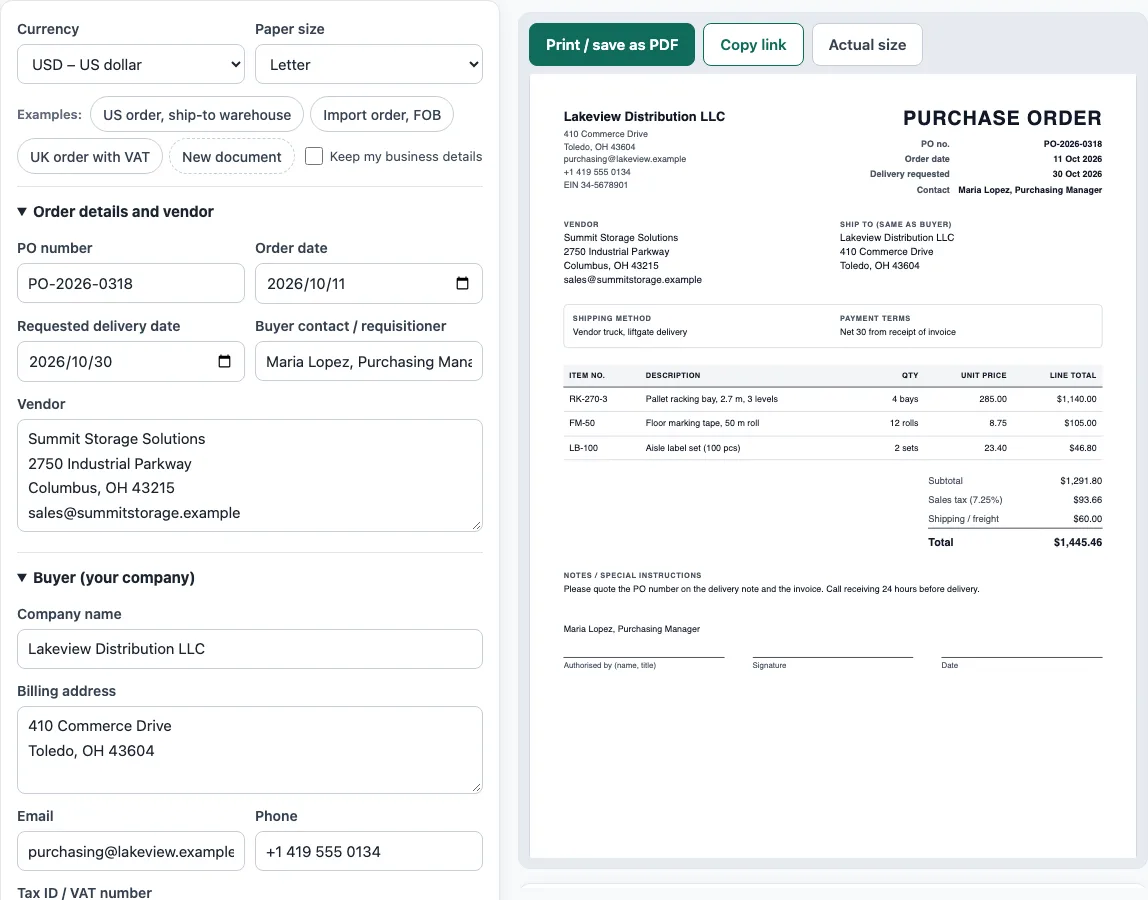
How to use the Purchase Order Template
- Order details and vendor: Type in a PO number, such as PO-2026-0042, along with the order date. Include the requested delivery date, the buyer contact or requisitioner, and the vendor you are ordering from.
- Buyer (your company): Provide your company name, billing address, email, phone and Tax ID / VAT number. Tick Keep my business details so they are saved for the next document you create.
- Delivery, shipping and payment terms: Supply the ship-to address, or tick Ship to the buyer address (same as buyer). Set the shipping method and payment terms. For international orders, also add the Incoterms 2020 shipping terms and a named place.
- Items ordered: Press Add item once per line. Complete the item number, description, quantity, unit, unit price and tax %. The row controls let you shift a line up or down, or delete it.
- Tax, shipping and other charges: Input the tax name and rate, followed by any shipping / freight and other charges. If tax applies to freight, tick Charge tax on shipping too.
- Notes and authorisation: Record any special instructions. Give the name and job title of the person approving the order. If you plan to sign the printed copy by hand, keep Date signed blank.
- Check the preview and totals: Review the Totals panel and any warnings below the preview before you finish.
What is a purchase order template?
A purchase order template is a standard layout for a PO, so every order has the same fields in the same places. A PO is a document the buyer sends to a supplier to order goods or services. It sets out what is wanted, how many, at what agreed price, when and where it should be delivered, and how it will be paid. Once the supplier accepts it, the PO becomes a binding agreement.
What information does a purchase order need?
A PO usually includes the title “Purchase order” and a unique PO number. It also shows the order date, the buyer’s billing details, the ship-to address and the vendor. Each line needs an item number or SKU, a description, a quantity, a unit price and a line total. Next come the subtotal, tax, shipping, the order total, the payment terms and an authorised signature.
The PO number matters most after the order is placed. Suppliers print it on the invoice, so the buyer can match the invoice to the order. Many accounts payable teams run a “three-way match” before paying: they compare the PO, the delivery note or receiving record, and the invoice. If the three agree, the invoice is paid. If they do not, the team checks with the supplier first. That is why each order needs its own PO number, and why a PO number should not be reused.
A PO is sent by the buyer before goods arrive. An invoice is sent by the seller after delivery, asking for payment. Keeping the two separate makes it clear who is ordering and who is billing.
Sources
- HMRC VAT Notice 700, section 16 and EU VAT Directive 2006/112/EC, Article 226: what a VAT invoice must show.
- ISO 4217 currency list (list one, published 17 September 2026): currency codes and decimals for all 36 offered currencies.
Worked examples
| Input | Result |
|---|---|
| 3 items in USD, Sales tax | Order total $1,458.37 |
| 3 items in EUR, no tax | Order total €8,760.00 |
| 2 items in GBP, VAT | Order total £492.80 |
| 1 items in CAD, no tax | Order total CA$1,139.94 |
Calculated by the tool above with these values.
Frequently asked questions
What is a sample purchase order?
A sample purchase order is a filled-in example that shows how each field is completed. Use the Examples buttons on this page to load one, then replace the sample details with your own.
Is there an example of a purchase order I can copy?
Yes. The US order, ship-to warehouse, Import order, FOB and UK order with VAT buttons each fill the form with a complete example. You can change any field before you print or save.
What is a PO order format?
A PO order format is the layout a PO follows: a title, a unique PO number, buyer and vendor details, ship-to details, a table of items, totals, payment terms and a signature line. This tool uses that layout, so you only need to fill in the fields.
Can I use this as a car purchase order template?
Yes. Enter the vehicle make, model and VIN in the description of the item, with the agreed price as the unit price. Add any delivery, tax or registration charges under the tax, shipping and other charges section.
Is there a Word version of this purchase order template?
You do not need a Word file: this purchase order template fills in the document in your browser and saves it as a PDF, which looks the same on every computer and cannot be changed by accident. If someone asks for an editable copy, copy the text from the preview into Word.
Is a purchase order the same as an invoice?
No. The buyer sends a purchase order to order goods or services. The seller sends an invoice after delivery to ask for payment. The PO number on the PO should also appear on the invoice.
Is this purchase order template free to use?
Yes. It is free, needs no account or sign-up, and runs in your browser. Documents you make here may be used for business with no attribution.
Related tools
- Quotation generator: a price quote carrying a validity date and an acceptance line.
- Invoice generator: build invoices with tax, discounts, shipping, payments and balance due.
- Delivery note template: records what was delivered, ready for the customer to sign.
- Proforma invoice template lists the pre-shipment invoice with Incoterms, ports and HS codes.
- Packing list template: cartons, weights and CBM, itemized package by package.
- Bill of lading template suits truck shipments as a straight bill of lading.
- Purchase requisition template: an internal purchase request, checked against the budget.
- Request for quotation template is an RFQ form suppliers complete with prices and lead times.
- Sales order template: the seller’s order confirmation, with deposit and balance due.