Price List Template (List of Prices Maker)
Enter your products and prices to get a clean price list with categories, validity dates and an optional tax-included column.
This free price list template turns your products into a clean list of prices that you print or save as a PDF, all in your browser. There is no sign-up, and nothing you type is uploaded. A live preview shows the finished sheet as you work, so you can see how the list will look before you share it.
The tool suits trade customers, shops, and exporters who want a clean, dated list of prices. It also handles the details customers ask about, such as item numbers, units, and minimum order quantities. Each item can carry its own category, so you can group items under headings. Use it as a price list maker or a price sheet template, or load an example to see a price list sample and a common price list format before you type your own.
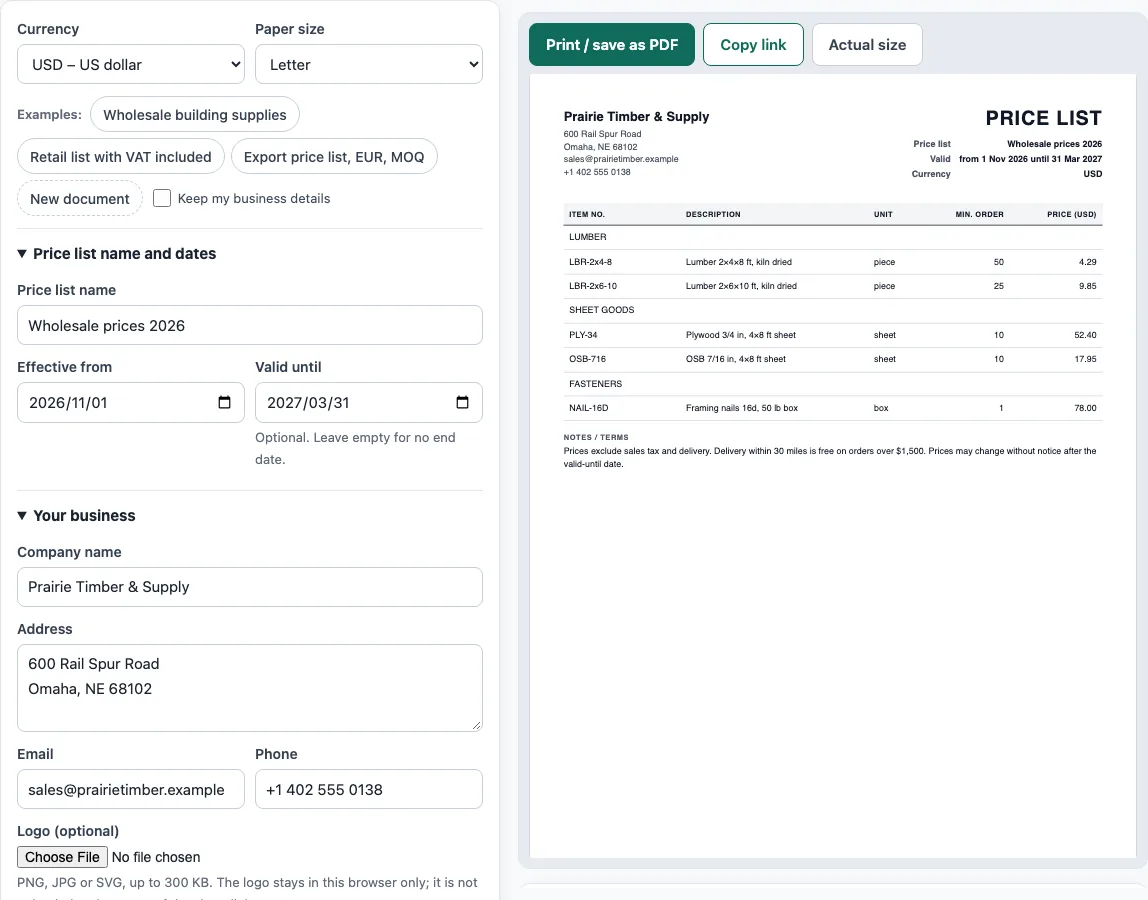
How to use the Price List Template
- Above the form, choose your currency and paper size (A4 or Letter).
- Open Price list name and dates. Enter a Price list name and an Effective from date. Leave Valid until empty if the prices have no end date.
- Open Your business and enter your Company name. The tool will warn you if this is missing. Add your address, email, and phone. You can also upload an optional logo (PNG, JPG or SVG, up to 300 KB).
- Open Products and prices. Click Add item for each product or service. Fill in the Item no., Product or service, Category, Unit, Price, and Min. order columns.
- Open Tax column and notes. Tick Add a column with tax included if you want tax-inclusive prices, then enter the Tax name and Tax rate (%). Add any delivery or payment terms in Notes / terms.
- Check the live preview and the Totals panel. Read any warnings below the preview.
- Click Print / save as PDF to print the list or save it as a PDF, or click Copy link to share the whole document.
You can start from an Examples button to see a filled-in sample, or use New document to clear the form. Tick Keep my business details to keep your company details when you start a new document. Your draft stays in this browser as you type, so it is still there when you return to the page.
What is a price list?
A price list is a document a business gives to customers. It lists the products or services it sells and their prices. It usually includes item numbers, units, the currency, the date the prices take effect, and how long they stay valid. Its purpose is to show what things cost, not to price a specific order.
What should a price list include?
Most price lists also add categories as headings, minimum order quantities (MOQ), and a note on whether prices include or exclude tax such as VAT, GST, or sales tax. Delivery and payment terms are often added too, along with a statement that prices may change after the valid-until date. Wholesale lists are for trade customers who buy to resell. Retail lists are for consumers. Export lists also state the currency and the Incoterms rule the prices are based on, such as FOB or EXW.
When prices include tax, the tax-inclusive price is the price excluding tax multiplied by (1 + tax rate). For example, 15.00 excluding 20 % VAT gives 15.00 × 1.2 = 18.00 including VAT. Where the result has more decimal places, it is rounded to the nearest cent, or to the nearest whole yen for yen. A value of 29.17 × 1.2 = 35.004 becomes 35.00. The tool rounds each tax-inclusive price in the same way, half away from zero, and the How the totals were calculated section shows the arithmetic using your numbers.
Sources
- HMRC VAT rates — the 20 % UK standard rate used in the VAT example (checked October 2026); an example, not tax advice.
- ISO 4217 currency list (list one, published 17 September 2026) — currency codes and the decimals each price is rounded to.
Worked examples
| Input | Result |
|---|---|
| 5 products in USD | Prices from $4.29 to $78.00 |
| 3 products in GBP, VAT 20% column added | Prices with tax from £18.00 to £45.00 |
| 3 products in EUR | Prices from €1.45 to €2.35 |
Calculated by the tool above with these values.
Frequently asked questions
Is a price list the same as a quotation?
No. A price list shows general prices for anyone who reads it. A quotation prices one customer’s specific request.
Is a price list the same as an invoice?
No. An invoice bills a delivered order. A price list does not refer to any particular order or delivery.
Can I use this template for both wholesale and retail customers?
Yes. Enter the prices and terms that apply to each audience, and make separate lists if the prices differ. Label each list clearly so customers know which one applies to them.
What does the tax column do?
When you tick Add a column with tax included, the tool adds a column with prices that include tax, based on the Tax rate (%) you enter. The column heading shows the Tax name you choose, such as VAT, GST, or Sales tax.
What happens if the valid-until date is before the effective date?
The tool shows a warning, because the list would never be valid. Check both dates and correct them before you print or share the document.
Is my business information uploaded anywhere?
No. Everything runs in your browser, and nothing you type is uploaded. The logo stays in this browser only and is not included in the share link.
Related tools
- Quotation generator — a price quote with a validity date and an acceptance line.
- Invoice generator — invoices with tax, discounts, shipping, payments and balance due.
- Sales order template — the seller’s order confirmation with deposit and balance due.
- Request for quotation template — an RFQ form suppliers fill in with prices and lead times.
- Proforma invoice template — the pre-shipment invoice with Incoterms, ports and HS codes.
- Invoice number generator — a numbering format and the next invoice numbers.