Invoice Number Generator
Pick a format, or type the last invoice number you used, and get the next invoice numbers ready to copy.
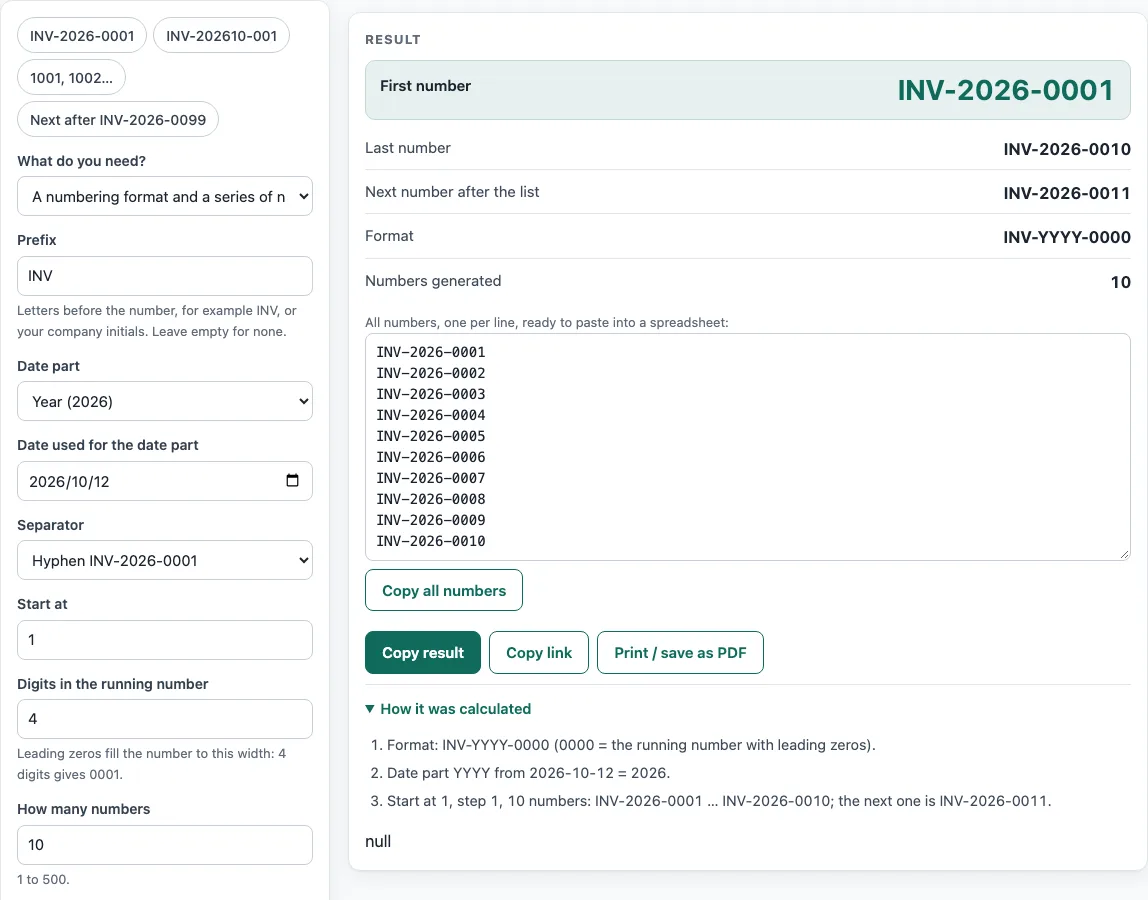
How to use the Invoice Number Generator
The tool has two modes. You can build a new format and series, or continue from the last invoice number you used.
- Under What do you need?, choose A numbering format and a series of numbers to build a new series, or The next numbers after one I already used to continue one.
- For a new series, type a Prefix such as INV, or leave it empty for none.
- Choose a Date part, such as Year (2026) or Full date (20261012), or choose No date. If you chose a date part, set the Date used for the date part.
- Choose a Separator: hyphen, slash, dot, underscore or none.
- Enter a Start at number and set Digits in the running number. For example, 4 digits gives 0001.
- Enter How many numbers (1 to 500). Under More options you can change the Step (usually 1) and add a Suffix, such as a branch code.
- To continue an existing series instead, type your Last invoice number used, such as INV-2026-0099.
- Check the results: First number, Last number, Next number after the list and Format.
- Click Copy all numbers to copy the full list, one per line, into a spreadsheet.
The example buttons fill in sample settings, including INV-2026-0001, INV-202610-001, 1001, 1002… and Next after INV-2026-0099. Use them to see how each setting changes the result before entering your own.
What is an invoice number?
An invoice number is a unique reference given to each invoice so the seller and the customer can identify it, match payments to it and find it later. Each invoice should have its own number, and numbers should not be reused.
What are common invoice number formats?
Common invoice number formats include a plain sequence (1001, 1002…), a prefix plus a sequence (INV-0001), and a prefix, the year and a sequence (INV-2026-0001), which restarts each year. Some businesses use year and month (INV-202610-001). A customer or branch code can be added as a prefix or a suffix. Choose the format that fits how you file and search your records.
Why do invoice numbers need leading zeros?
Leading zeros keep every number the same length, so 0001, 0002 and 0099 sort in the right order in spreadsheets and file names. Without them, 10 would sort before 9 when treated as text. When the sequence grows past the width you chose, the numbers get one digit longer. With 4 digits, the count moves from 9999 to 10000. Choose enough digits at the start so the numbers stay the same length for as long as you expect to use them.
How is the next invoice number worked out?
When you type a last invoice number, the tool counts up the last group of digits and keeps its width. So INV-2026-0099 is followed by INV-2026-0100. When you build a new series instead, the Step setting (under More options) controls how much each number goes up; a step of 1 is usual.
Do invoice numbers have to be sequential for VAT?
In the UK, HMRC requires a VAT invoice to show a unique sequential number based on one or more series that identifies the invoice. In the EU, the VAT Directive (2006/112/EC, Article 226) requires a sequential number based on one or more series that uniquely identifies the invoice. The numbers this tool generates follow that pattern, but you are responsible for checking the rules that apply to your business.
Sources
- HMRC VAT Notice 700, paragraph 16.3.1 — a full VAT invoice shows “a sequential number based on one or more series which uniquely identifies the document”.
- EU VAT Directive 2006/112/EC, Article 226(2) — “a sequential number, based on one or more series, which uniquely identifies the invoice”. Checked October 2026.
Worked examples
| Input | Result |
|---|---|
| Format INV-YYYY-0000, 10 numbers | INV-2026-0001 to INV-2026-0010, next INV-2026-0011 |
| Format ACME/YYMM/000, 5 numbers | ACME/2610/001 to ACME/2610/005, next ACME/2610/006 |
| 3 numbers after INV-2026-0099 | INV-2026-0100 to INV-2026-0102, next INV-2026-0103 |
| Format 0000, 5 numbers | 1001 to 1005, next 1006 |
Calculated by the tool above with these values.
Frequently asked questions
Can I reuse an invoice number if an invoice is cancelled?
No. Each invoice should have its own number, and numbers should not be reused. Keep a cancelled invoice’s number in your records rather than giving it to a new invoice.
Should I put the year in my invoice number?
It is optional. A format such as INV-2026-0001 includes the year and restarts the count each year, which makes it easy to see when an invoice was issued. Choose No date if you want one unbroken sequence.
What happens when my running number gets too long?
Once the count passes the number of digits you chose, the numbers become one digit longer and stop lining up. The tool shows a warning when this happens. To avoid it, set more digits from the start.
Is anything I type uploaded?
No. Everything runs in your browser, and nothing you type is uploaded.
Can I paste the numbers into a spreadsheet?
Yes. Click Copy all numbers: the list is copied one number per line, so it pastes into one spreadsheet column. You can also select the numbers in the box under the result.
Can I use these invoice numbers for business?
Yes. The numbers are free to use in any business, with no attribution. The tool does not register them anywhere, so keep your own list of the numbers you issue.
Related tools
- Invoice generator — invoices with tax, discounts, shipping, payments and balance due.
- Invoice due date calculator — due dates for Net 30, EOM and 2/10 net 30 terms.
- Quotation generator — a price quote with a validity date and an acceptance line.
- Sales order template — the seller’s order confirmation with deposit and balance due.
- Purchase order template — a purchase order to send to your supplier.
- Proforma invoice template — the pre-shipment invoice with Incoterms, ports and HS codes.
- Hourly invoice template — hours times a rate, with billing blocks and expenses.
- Contractor invoice template — labour and materials with a markup and a deposit.
- Statement of account template — a customer statement with a running balance and ageing.