Invoice Due Date Calculator
Enter the invoice date and the payment terms to see the due date, the early-payment discount date and how many days are left.
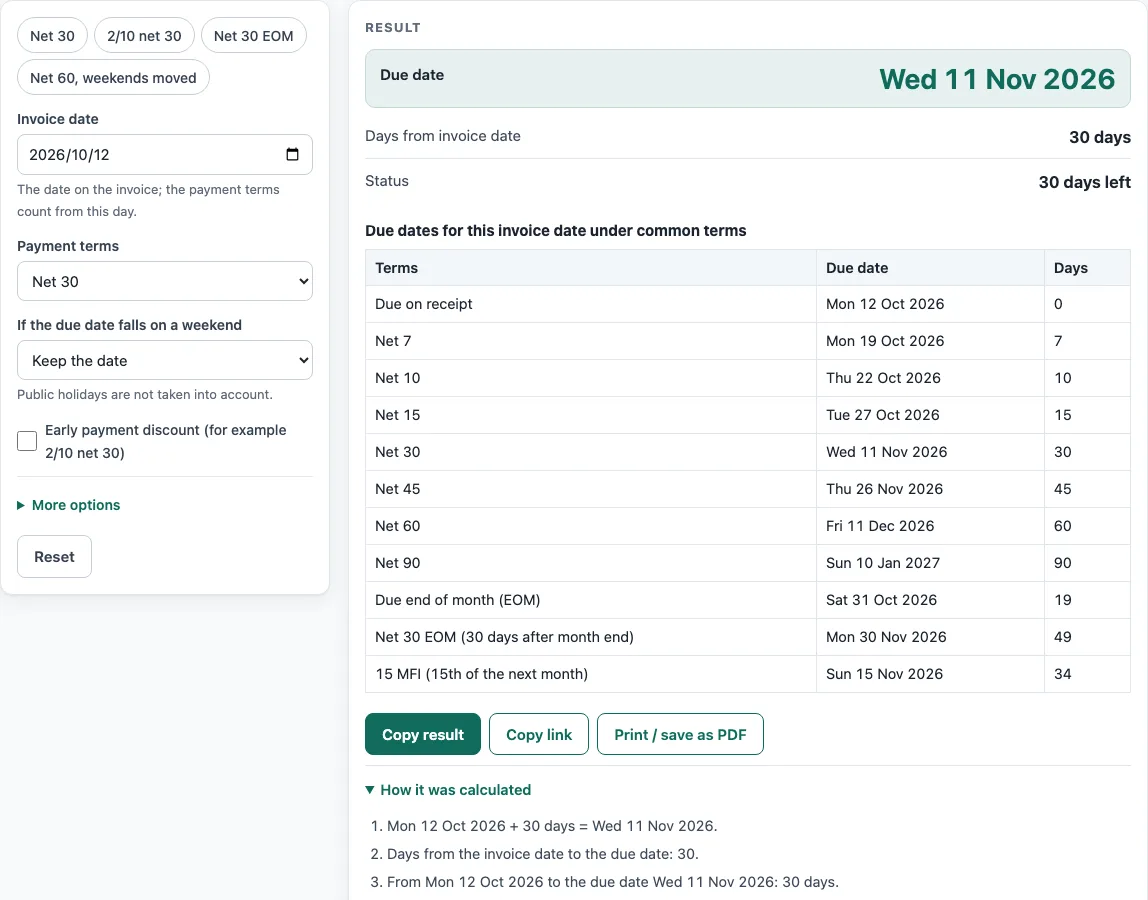
How to use the Invoice due date calculator
- Enter the Invoice date; the payment terms count from this day.
- In Payment terms, choose an option, such as Net 30, Net 60 or Due end of month (EOM). If the number of days you need is not in the list, choose Custom number of days, then type the number in Days after the invoice date.
- In If the due date falls on a weekend, choose Keep the date, Move to the next Monday, or Move to the Friday before.
- If the customer may take an early payment discount, tick Early payment discount (for example 2/10 net 30), then fill in Discount (%) and If paid within (days).
- Optional: open More options and enter the Invoice amount (optional) to see the discount and the amount to pay early.
- Read the results: Due date, Days from invoice date, Status, Pay by this date for the discount, Discount amount and Amount to pay with the discount.
- Under More options, leave Days left counted from as today, or change it to check the status on another date.
- Use Copy result, Copy link or Print / save as PDF to keep or share the result; the printout lists your inputs, the results and the steps.
The Examples buttons fill the form with sample terms: Net 30, 2/10 net 30, Net 30 EOM, and Net 60 with weekends moved. The tool also shows a table of due dates for the same invoice date under all the common terms, so you can compare them side by side.
What does Net 30 mean on an invoice?
Net 30 means the full amount falls due 30 days after the invoice date. Counting is done in calendar days, with the invoice date itself counted as day 0. An invoice dated Monday 12 October 2026 on Net 30 is due Wednesday 11 November 2026. Net 7, Net 15, Net 45, Net 60 and Net 90 follow the same method, just with different day counts.
How do you work out a due date from payment terms?
To find a due date, add the number of days in the terms to the invoice date. Due on receipt is the one exception: payment is owed when the invoice arrives, so the calculator shows the invoice date. For every other term, the result is simply invoice date plus the number of days.
What does Net 30 EOM mean?
EOM is short for end of month. Due end of month means the last day of the invoice month. Net 30 EOM means 30 days after the end of the invoice month, so an invoice dated 28 October 2026 is due 30 November 2026. 15 MFI means the 15th of the month after the invoice. Companies don’t always write EOM terms the same way, so the tool states which reading it uses.
What is a 2/10 net 30 discount?
Under “2/10 net 30”, the customer may take a 2 % discount if they pay within 10 days of the invoice date. Paying later means the full amount is due within 30 days. On a 4,800.00 invoice dated 12 October 2026, the discount is 96.00, so the early payment comes to 4,704.00, and it must be paid by 22 October 2026.
What happens when a due date falls on a weekend?
When a due date lands on a Saturday or Sunday, you can keep it, move it to the next Monday, or move it to the Friday before. Public holidays are not known to the calculator, so a due date on a holiday stays where it is. Pick a weekend rule only if your customers pay on working days.
Sources
- CliffsNotes, Accounting Principles I: Sales Discounts — 2/10, n/30: 2 % off if paid within ten days of the invoice date, otherwise the balance is due within thirty days.
- My Accounting Course, End of Month (EOM): EOM is an attribute of credit terms tied to the end of a month. Companies read EOM terms in different ways, so the calculator states its reading: “Net 30 EOM” = 30 days after the end of the invoice month.
- Dates are Gregorian calendar arithmetic; weekdays and leap years are computed, public holidays are not.
Worked examples
| Input | Result |
|---|---|
| Invoice dated Mon 12 Oct 2026, Net 30 | Due Wed 11 Nov 2026 (30 days) |
| Invoice dated Wed 28 Oct 2026, Net 30 EOM (30 days after month end) | Due Mon 30 Nov 2026 (33 days) |
| Invoice dated Mon 12 Oct 2026, Net 30, 2% if paid within 10 days on 4,800.00 | Due Wed 11 Nov 2026 (30 days); pay 4,704.00 by Thu 22 Oct 2026 with the discount |
| Invoice dated Fri 13 Nov 2026, Net 30, weekend dates moved | Due Mon 14 Dec 2026 (31 days) |
Calculated by the tool above with these values.
Frequently asked questions
Does the calculator count working days or calendar days?
It counts every calendar day, weekends and holidays included. A separate weekend rule can shift a due date that lands on a Saturday or Sunday.
Does the tool take public holidays into account?
No. Public holidays are ignored, so look over any due date close to a holiday yourself.
How do I check whether an invoice is overdue?
Look at the Status line, which reports whether the invoice is overdue and by how many days. Days are counted from today by default, though you can alter Days left counted from to test a different date.
Does the calculator work out late payment interest or fees?
No. Those charges hinge on the contract and on local law, and this tool only works out dates.
What does Net 30 mean if the invoice date is the 31st?
Whatever the date, the calculator adds 30 calendar days. For an invoice dated 31 December 2026, Net 30 gives a due date of 30 January 2027, while Net 60 gives 1 March 2027.
Can I see all the common terms at once?
Yes. A table below the result shows the due date and day count for the same invoice date under each term in the list, running from Due on receipt to 15 MFI.
Related tools
- Invoice generator: builds invoices with tax, discounts, shipping, payments and balance due.
- Invoice number generator: gives you a numbering format plus the next invoice numbers.
- Sales order template: a seller’s order confirmation showing deposit and balance due.
- Purchase order template: for a purchase order you send to your supplier.
- Quotation generator: prepares a price quote with a validity date and an acceptance line.
- Proforma invoice template: a pre-shipment invoice covering Incoterms, ports and HS codes.
- Hourly invoice template: hours multiplied by a rate, with billing blocks and expenses.
- Contractor invoice template: labour and materials, with a markup and a deposit.
- Statement of account template: a customer statement carrying a running balance and ageing.