Hourly Invoice Template (Hours × Rate Calculator)
Type your hours and your hourly rate to get an invoice with the billed hours, the total and the due date, ready to print or save as PDF.
This hourly invoice template turns the hours you worked into an invoice for a client. You enter each piece of work with its hours, and the tool multiplies the hours by your hourly rate, adds up the billed hours and the total, and shows the finished invoice in a live preview. You can print it or save it as a PDF.
It is for freelancers, consultants, tutors, tradespeople and anyone who bills by the hour. Hours can be typed as decimals (7.5) or as hours and minutes (7:30). If your contract bills in blocks of 6, 15 or 30 minutes, the tool rounds every entry up to a whole block for you, and the arithmetic is written out so you can show the client how the hours were counted.
The tool runs in your browser. There is no account and nothing you type is uploaded.
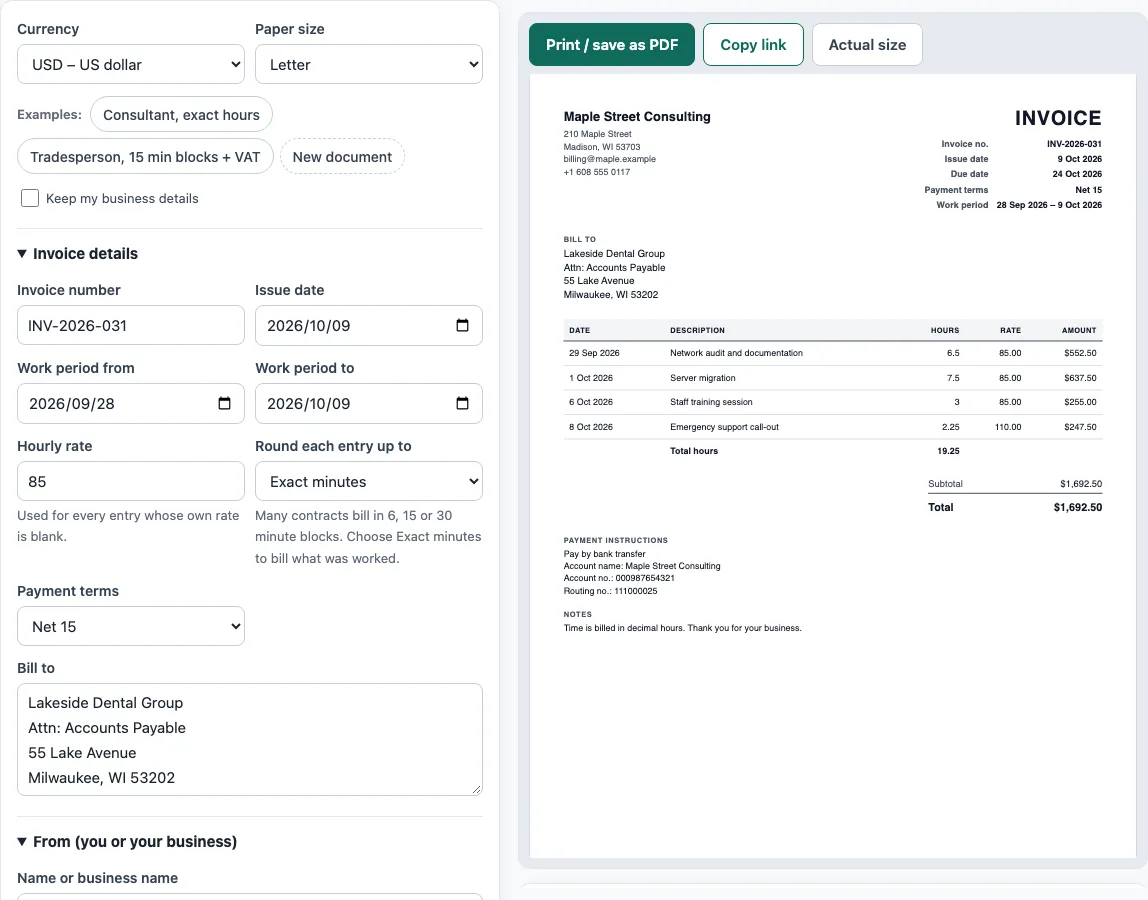
How to use the Hourly Invoice Template
- Start by picking a Currency and a Paper size above the form. Want to see a finished invoice first? Click one of the Examples buttons: Consultant, exact hours, or Tradesperson, 15 min blocks + VAT.
- Under Invoice details, type the Invoice number and Issue date. Fill in Work period from and Work period to if you want the period printed. Your Hourly rate goes here too, and you pick a rounding option under Round each entry up to: Exact minutes, 6 minutes, 15 minutes, 30 minutes or 1 hour.
- Select your Payment terms next. The Due date is calculated from the issue date, or you can select Pick a due date to enter one yourself. Add the client’s name and address under Bill to.
- Your own details go in From (you or your business): Name or business name, Address, Email and Phone. You can also upload an optional logo.
- In Time entries, click Add item for each piece of work, then fill in the Date, What you did and the Hours. If you leave Rate empty, the hourly rate applies. To bill a different rate for that entry, such as a higher one for urgent work, type it in instead.
- Last, open Tax, expenses and payment. Pick a tax setting, then add any Expenses to reimburse and any Amount already paid.
- Review the preview, the Totals panel and any warnings. Then click Print / save as PDF (choose Save as PDF in the print dialog) or Copy link.
How do you calculate an hourly invoice?
Multiply the hours worked by the hourly rate for each entry, then add the entries. If you worked 6.5 hours at 85 per hour, that line is 6.5 × 85 = 552.50. Add the other lines to get the subtotal, then add tax and any expenses.
Minutes need converting to hours first. Divide the minutes by 60: 15 minutes is 0.25 hours, 30 minutes is 0.5, 45 minutes is 0.75, and 6 minutes is 0.1. Some times do not convert to a short decimal. 7 hours 10 minutes is 430 minutes, which is 7.1667 hours, so at 85 per hour the line is 430 ÷ 60 × 85 = 609.17 after rounding to the cent. Exact minutes stay in the calculation, so the tool never rounds the hours first and the money second.
What is a billing increment and how does rounding up work?
A billing increment, or billing block, is the smallest slice of time you charge for. If a client agrees to 15 minute blocks, 5 hours 10 minutes is billed as 5 hours 15 minutes, which is 5.25 hours, and at 60 per hour that line is 315.00. The same entry in 6 minute blocks is billed as 5 hours 12 minutes, because 310 minutes rounds up to 312.
You and your client agree on the block size. Each entry gets the rule you pick, and the tool prints the billed hours, so write the rule in your contract or in the invoice notes.
What should an hourly invoice include?
An invoice should carry a unique invoice number, your name and contact details, the client’s name and address, a clear description of what you are charging for, the date of the work, the date of the invoice, the amounts charged, and the total owed. If you charge VAT, the VAT amount must be shown as well. For an hourly job, show the hours and the rate for each line so the client can check the multiplication.
Payment terms and the way to pay belong here too. Choosing Net 15 or Net 30 sets a due date, and the tool prints it.
Sources
- GOV.UK, Invoices: what they must include (checked October 2026): the items an invoice must show.
- HMRC VAT Notice 700, section 16 and EU VAT Directive 2006/112/EC, Article 226: what a VAT invoice must show.
- ISO 4217 currency list (list one, published 17 September 2026) — currency codes and decimals for all 36 offered currencies.
Worked examples
| Input | Result |
|---|---|
| 4 entries, 19.25 h in USD, exact minutes | Total $1,692.50 |
| 3 entries, 13.25 h in GBP, rounded up to 15 min | Total £1,000.08 |
| 2 entries, 2 h in EUR, rounded up to 30 min | Total €114.24 |
| 1 entries, 2.5 h in JPY, exact minutes | Total ¥15,000 |
Calculated by the tool above with these values.
Frequently asked questions
Is the hourly invoice template really free?
Yes. The tool is free to use, and you do not need an account or sign-up to create an invoice.
Can I type hours as 7:30 instead of 7.5?
Yes. Both are accepted in the Hours box. 7:30 and 7.5 both mean 7 hours 30 minutes. Minutes must be 0 to 59 after the colon.
Can I charge a different rate for some entries?
Yes. Every entry has its own Rate box. If it is empty, the hourly rate from Invoice details is used. If you type a rate there, only that entry uses it.
Should I charge tax on expenses?
That depends on where you work and what the expense is, so the tool does not decide. The tax setting applies one rate to the hours. Tick Charge tax on expenses too only if tax applies to them under your local rules.
Is the invoice the same as a timesheet?
No. A timesheet records time worked. An invoice asks for payment. This template lists each time entry with its date and hours, so the invoice can double as a record of what was billed, but it does not track a running clock.
Is my information sent to a server?
No. Everything runs in your browser and nothing you type is uploaded. The draft is saved in your browser only, and nothing is stored on a server.
Related tools
- Invoice generator: handles tax, discounts, shipping, payments and balance due.
- Contractor invoice template: covers labour and materials, plus a markup and a deposit.
- Quotation generator: builds a price quote with a validity date and an acceptance line.
- Invoice due date calculator: works out due dates for Net 30, EOM and 2/10 net 30 terms.
- Invoice number generator: sets a numbering format and lists the next invoice numbers.
- Statement of account template: a customer statement showing a running balance and ageing.