Delivery Order Template (Sample D/O, No Word Needed)
Fill in the bill of lading, the goods and who may collect them to get a delivery order that releases cargo from a terminal or warehouse.
How to use the Delivery Order Template
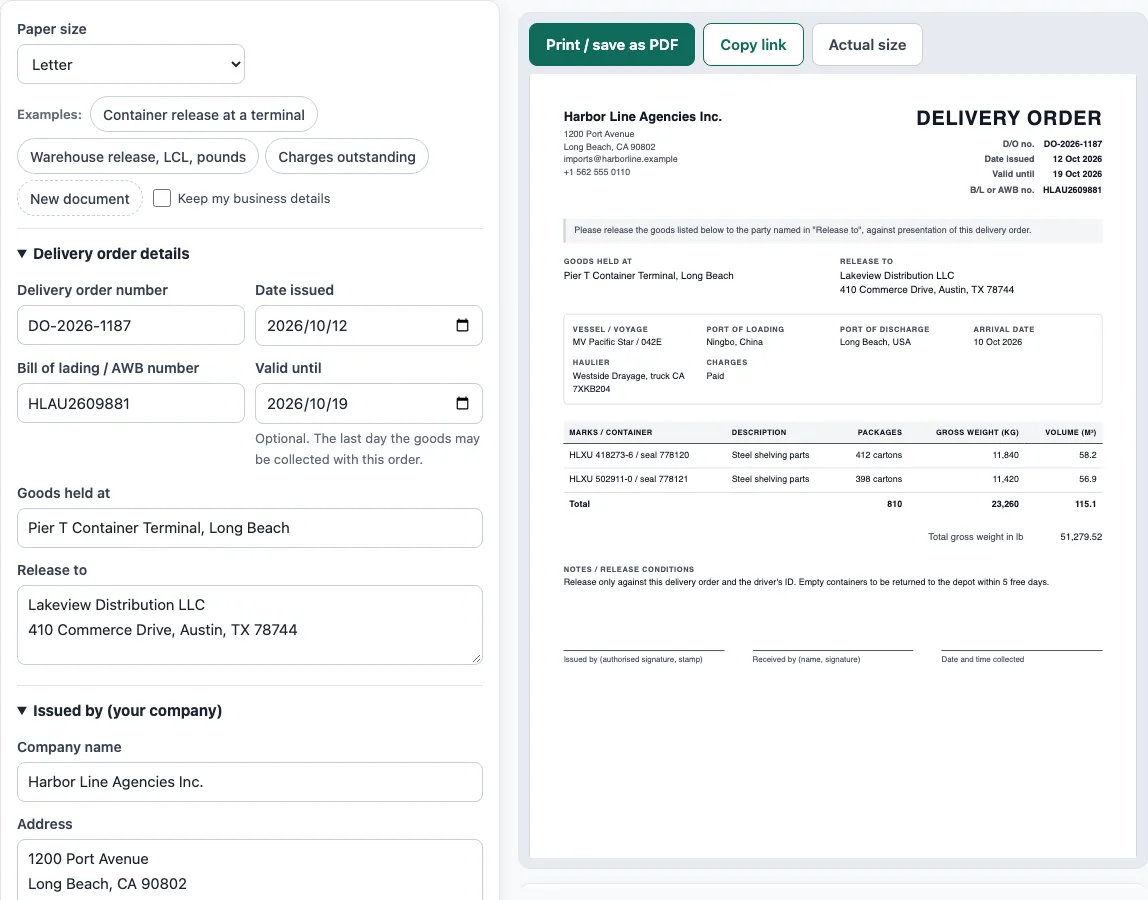
- Above the form, choose a paper size (A4 or Letter). A delivery order shows no prices, so there is no currency to set.
- For a delivery order sample, click an ‘Examples:’ button such as ‘Container release at a terminal’, then replace its details.
- In ‘Issued by (your company)’, enter the Company name, Address, Email and Phone.
- In ‘Delivery order details’, enter the Delivery order number, Date issued and Bill of lading / AWB number. Add a Valid until date if the goods have a collection deadline, then fill in Goods held at (the terminal, CFS or warehouse) and Release to (the party collecting).
- In ‘Shipment and charges’, fill in the Vessel / voyage or flight, Arrival date, Port of loading, Port of discharge and Haulier / truck.
- In ‘Goods to release’, click ‘Add item’ for each row, then fill in Marks / container no., Description, Packages, Kind, Gross weight and Volume (m³).
- In ‘Weight unit, receiver and notes’, pick Kilograms (kg) or Pounds (lb), enter the Received by (name) and add any Notes / release conditions.
- Check the live preview, the Totals and any warnings.
- Click ‘Print / save as PDF’ to print only the document, or ‘Copy link’ to share a link that holds the whole document.
The draft is saved in your browser as you type. ‘New document’ clears the form, and ‘Keep my business details’ keeps your company details.
What is a delivery order in shipping?
A delivery order (D/O) is a document that authorises the release of cargo. The party that controls the goods, such as the carrier or its agent, a freight forwarder, a warehouse or the seller, instructs the terminal, container freight station or warehouse holding them to deliver them to the named party.
When is a delivery order issued?
For sea freight, the carrier or its agent typically issues the delivery order to the consignee after the original bill of lading (or a telex release) has been surrendered and freight and local charges have been paid. The order is then presented at the place where the goods are held.
What should a delivery order show?
A delivery order usually shows the D/O number and date, the bill of lading or air waybill number, the vessel and voyage (or flight), the port of loading and port of discharge, the arrival date, and where the goods are held. It also shows the party they are released to, container numbers and seals or shipping marks, the number and kind of packages, the description, gross weight and volume, any conditions of release, and signatures of the issuer and the person collecting.
How is a delivery order different from a delivery note?
Some businesses use “delivery order” for an order to deliver goods to a customer, which is close to a delivery note. A delivery note travels with the goods and is signed by the receiver. A delivery order is presented to get goods released.
How do pounds and kilograms convert?
One pound equals 0.45359237 kg exactly. To convert pounds to kilograms, multiply by that figure. To convert kilograms to pounds, divide by it. For example, 11,840 kg plus 11,420 kg is 23,260 kg, which equals 51,279.52 lb. Line weights should use the same unit, so pick the unit before you enter them. Packages add in the same way: 412 cartons plus 398 cartons is 810 cartons, and volumes add directly, so 58.2 m³ plus 56.9 m³ is 115.1 m³.
Sources
- A. N. Deringer, glossary: delivery order — a delivery order is issued by a carrier or its agent to release cargo to a named party, normally after the bill of lading is surrendered and charges are paid.
- NIST SP 811, Appendix B — 1 lb = 0.45359237 kg exactly, used for the kg/lb totals.
Worked examples
| Input | Result |
|---|---|
| 2 lines on B/L HLAU2609881 | 810 packages, 23,260 kg gross |
| 2 lines on B/L PFF-HBL-20931 | 7 packages, 675 lb gross |
Calculated by the tool above with these values.
Frequently asked questions
Is a delivery order the same as a bill of lading?
No. The bill of lading or air waybill is the transport document, and its number appears on the delivery order. The terminal matches the release to that number, so enter it exactly as it appears on the original document.
Can goods be released if the charges are not paid?
Terminals and warehouses usually release goods only after the charges are paid. The tool shows a warning when ‘Freight and local charges paid’ is unticked, and you can use the ‘Charges outstanding’ example to see how that appears on the order.
What does ‘Valid until’ mean?
It is the last day the goods may be collected with this order. The field is optional. If the date is before the date issued, the tool shows a warning.
Can I use the documents I make here for business?
Yes. Documents made here may be used for business with no attribution.
Does the tool store the details I enter?
Everything runs in your browser and nothing you type is uploaded. The draft is saved only in this browser, and nothing is stored on a server.
Can I print the delivery order on A4 or US Letter paper?
Yes. Choose A4 or Letter above the form; Print / save as PDF prints only the delivery order, without the website around it.
Related tools
- Bill of lading template — a straight bill of lading for truck shipments.
- Packing list template — cartons, weights and CBM, package by package.
- Delivery note template — what was delivered, for the customer to sign.
- Commercial invoice template — the customs invoice for an international shipment.
- Shipping label generator — address labels for boxes and pallets, numbered 1 of N.
- Certificate of origin template — the exporter’s origin declaration for a chamber to certify.