Delivery Note Template
Fill in the order reference, delivery address and items to get a delivery note with a received-by signature block.
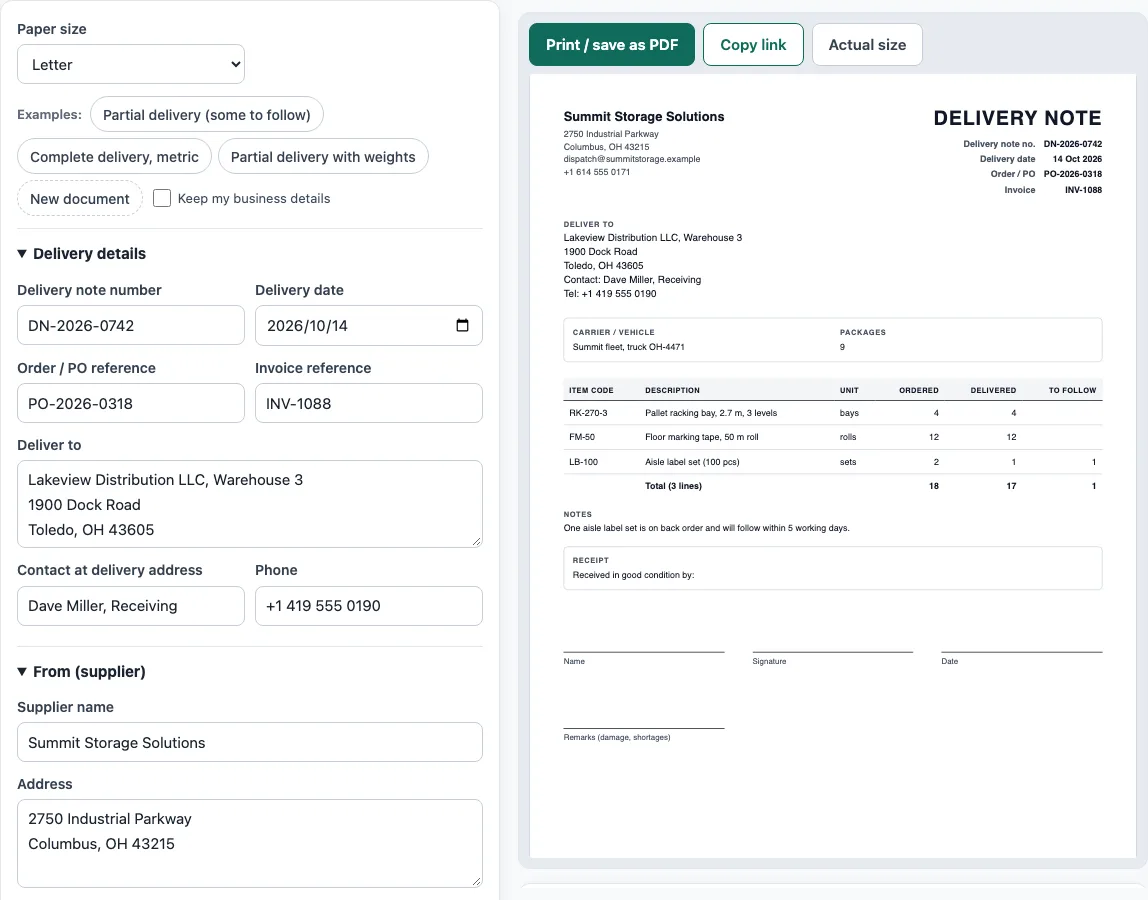
How to use the Delivery Note Template
- Choose a paper size above the form: A4 or Letter. A delivery note normally shows no prices, so you can leave the currency setting as it is.
- To start from an example, click one of the Examples buttons: ‘Partial delivery (some to follow)’, ‘Complete delivery, metric’ or ‘Partial delivery with weights’. To start empty, click ‘New document’.
- Open the ‘From (supplier)’ section and fill in Supplier name, Address, Phone and Email. You can also upload an optional logo.
- Open ‘Delivery details’ and fill in Delivery note number, Delivery date, Order / PO reference, Invoice reference, Deliver to, Contact at delivery address and Phone.
- In ‘Goods delivered’, fill in each row with Item code, Description, Unit, Qty ordered and Qty delivered. Click ‘Add item’ for more rows, and move or remove rows as needed.
- In ‘Carrier, packages, notes and receipt’, fill in Carrier / vehicle, Number of packages, Notes, and the optional Receiver name to print above the line and Remarks to print.
- Check the live preview and the result lines: Lines, Total ordered, Total delivered, Total to follow and Packages. Read any warnings before you print.
- Click ‘Print / save as PDF’ and choose Save as PDF in the browser’s print dialog. To share the document, click ‘Copy link’.
Tick ‘Keep my business details’ if you want your company details kept when you start a new document.
What is a delivery note?
A delivery note is a document that goes with a delivery. It lists the goods delivered and their quantities, so the receiver can check the delivery and sign for it. It normally shows no prices.
What should a delivery note template include?
A delivery note template should include the title “Delivery note”, the delivery note number, the date and the order or PO number. It also needs the supplier, the delivery address and a contact. Each item should show its item code, description, unit, quantity ordered and quantity delivered. Most templates also include a note of items to follow (backorder), the number of packages, and a “received by” section with name, signature, date and condition notes.
How is a delivery note different from a packing list or an invoice?
A delivery note confirms what arrived and in what quantity. A packing list gives detailed package contents for shipping and customs. An invoice asks for payment and shows prices. The three documents can refer to the same order, but each one has a different job.
What happens to a delivery note after the goods arrive?
The customer signs the delivery note as proof of delivery. One copy stays with the customer, and one returns to the supplier. If the delivery is short or damaged, the receiver should write this on the delivery note before signing. Before payment, the signed delivery note, the purchase order and the invoice are usually matched together. This is called a three-way match.
How do partial deliveries and backorders work?
When only part of an order can be sent, the delivery note shows both numbers for each line: the quantity ordered and the quantity delivered. The difference is the quantity to follow, which tells the customer what is still on backorder. When the rest is shipped, a new delivery note with its own number lists the remaining items against the same order reference, so every delivery can be checked on its own.
Sources
- Unit conversions: 1 lb = 0.45359237 kg exactly and 1 in = 2.54 cm exactly (NIST SP 811, Appendix B).
Worked examples
| Input | Result |
|---|---|
| 3 lines, 18 ordered | 17 delivered, 1 to follow |
| 3 lines, 90 ordered | 90 delivered, 0 to follow |
| 4 lines, 493.5 ordered | 320.2 delivered, 173.3 to follow |
| 1 lines, 100 ordered | 100 delivered, 0 to follow |
Calculated by the tool above with these values.
Frequently asked questions
Is a delivery note the same as a receipt for payment?
No. A delivery note shows that goods arrived and what quantity was received. It does not ask for payment, and it is not proof that an invoice has been paid.
Does a delivery note need prices?
Usually not. The receiver needs to check the items and quantities, so prices are normally left off. If you need prices and payment terms, use an invoice instead.
What do I do if only part of an order has arrived?
Enter the quantity actually delivered in the Qty delivered column, and the rest will show in the Total to follow result line. Use the ‘Partial delivery (some to follow)’ example to see how this looks.
Should the delivery note number match the invoice number?
No, they are separate documents and usually have their own number series. Put the order or PO reference, and the invoice reference if one exists, on the delivery note so the three documents can be matched.
How many copies should I print?
Print two: one stays with the customer and one, signed, goes back to the supplier as proof of delivery. Some businesses add a third copy for the driver or the carrier.
Can I leave the receiver name blank?
Yes. The receiver name and Remarks to print fields are optional. If you leave them empty, the receiver can write the name and any damage or shortages by hand.
Related tools
- Packing list template — cartons, weights and CBM, package by package.
- Invoice generator — invoices with tax, discounts, shipping, payments and balance due.
- Purchase order template — a purchase order to send to your supplier.
- Shipping label generator — address labels for boxes and pallets, numbered 1 of N.
- Bill of lading template — a straight bill of lading for truck shipments.
- Quotation generator — a price quote with a validity date and an acceptance line.
- Delivery order template — the D/O that releases cargo from a terminal or warehouse.
- Sales order template — the seller’s order confirmation with deposit and balance due.