Contractor Invoice Template (Labour and Materials)
List your labour and your materials, add a markup on materials and a deposit, and get a contractor invoice with the balance due.
This contractor invoice template builds an invoice for a job that has both labour and materials. Each line is marked as Labour or Materials. Labour is quantity times rate, such as hours at an hourly rate. Materials are quantity times your cost, and the tool adds your markup to each material line. The invoice shows labour, materials, tax, any deposit already paid and the balance due.
It suits builders, electricians, plumbers, painters, landscapers and other independent contractors and subcontractors. For work billed only by the hour, the hourly invoice template is simpler.
The tool runs in your browser. There is no account and no sign-up, and nothing you type is uploaded. Your draft stays saved in this browser, so it is still there when you come back.
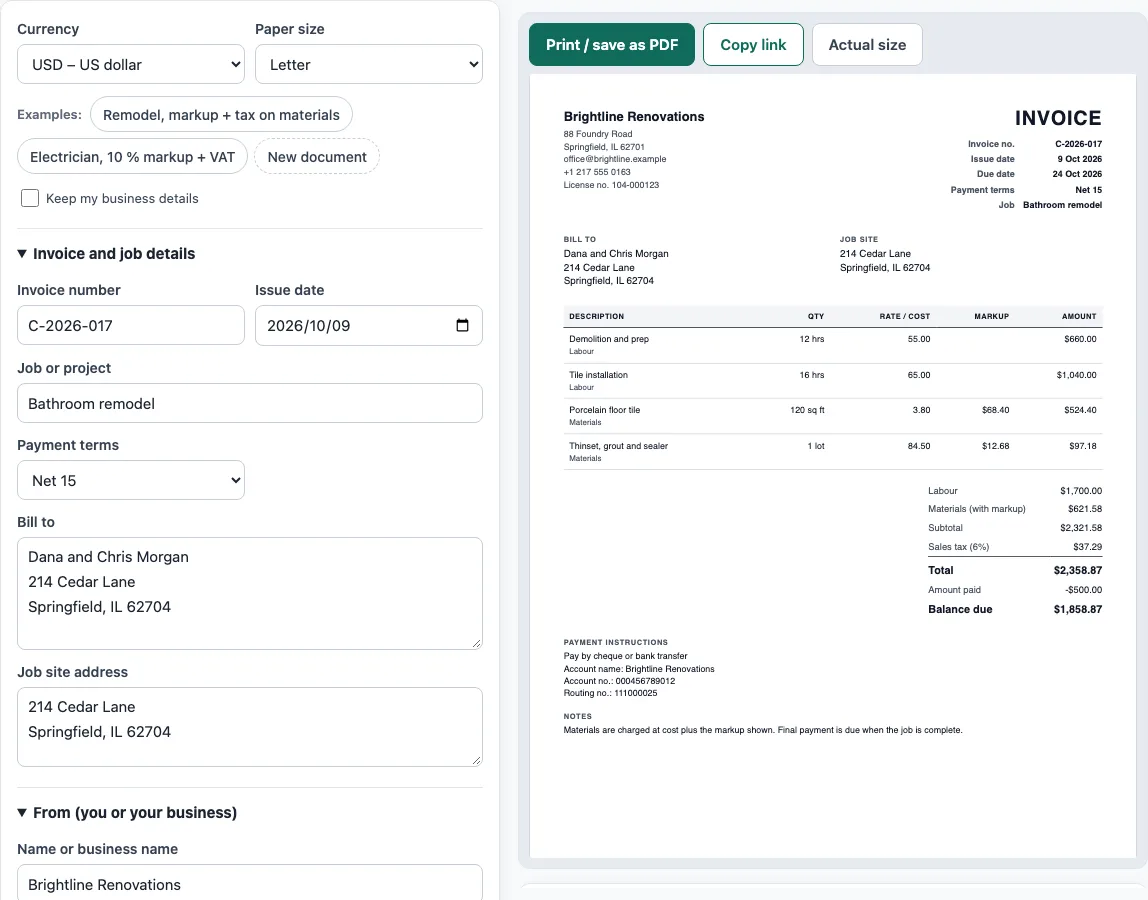
How to use the Contractor Invoice Template
- Above the form, pick a Currency and a Paper size. To see a finished invoice first, click one of the Examples buttons: Remodel, markup + tax on materials, or Electrician, 10 % markup + VAT.
- Under Invoice and job details, enter the Invoice number, Issue date, Job or project, Payment terms, Bill to and the Job site address.
- In From (you or your business), enter your name or business name, address, email and phone, and your licence, tax or VAT number if you have one. An optional logo can be uploaded.
- In Labour and materials, click Add item for each line. Choose the Type, Labour or Materials, then fill in Description, Quantity, Unit and Rate or cost per unit.
- In Tax and payment, set the Markup on materials (%). Choose the tax setting: No tax, One rate on labour and materials, or Rate on material lines only. Enter the Tax rate (%) and any Deposit or amount already paid.
- Check the preview, the Totals panel and any warnings, then click Print / save as PDF (choose Save as PDF in the print dialog) or Copy link.
You can click New document to clear the form. Tick Keep my business details first if you want your name, address and bank details to stay for the next invoice. Your draft stays in this browser as you type.
How do you add a markup to materials on a contractor invoice?
Work out the cost of the material line, then add your markup percentage to it. Take 120 square feet of tile at a cost of 3.80 per square foot, which is 456.00. A 15 % markup is 456.00 × 15 % = 68.40, so the line is billed at 524.40. The tool does this for every material line and rounds each markup to the cent before adding it. A markup of 15 % on 84.50 is 12.675, which becomes 12.68, so that line is 97.18.
Markup and margin are not the same. Markup is a percentage of your cost. Margin is a percentage of the price you charge. A 15 % markup is a margin of 15 ÷ 115, which is about 13 %. Enter the markup, not the margin, in this tool.
What should a contractor invoice include?
A contractor invoice should carry a unique invoice number, your name and contact details, the client’s name and address, a clear description of the work and materials you are charging for, the date of the invoice and the date the work was done, the amounts charged and the total owed. If you charge VAT, the VAT amount must be shown too.
For a job with a deposit, show the total, the deposit received and the balance due, so the client can see what is left to pay. Add the payment terms and how to pay. Many contractors also print their licence number and the job site address on the invoice.
Is a contractor the same as an employee?
Not usually. In the United States the IRS looks at the whole relationship, including how much behavioural and financial control the payer has and what kind of relationship it is, and treats a person who provides services to other businesses as generally self-employed. A contractor sends invoices for the work. An employee is paid through payroll. The tool makes invoices only, and it does not decide how a worker should be classified.
Sources
- GOV.UK, Invoices: what they must include (checked October 2026) — the items an invoice must show.
- HMRC VAT Notice 700, section 16 and EU VAT Directive 2006/112/EC, Article 226 — what a VAT invoice must show.
- IRS, Independent contractor (self-employed) or employee? (checked October 2026) — the three kinds of evidence used to classify a worker.
- ISO 4217 currency list (list one, published 17 September 2026) — currency codes and decimals for all 36 offered currencies.
Worked examples
| Input | Result |
|---|---|
| 4 lines in USD, markup 15% | Total $2,358.87 |
| 2 lines in GBP, markup 10% | Total £1,090.73 |
| 2 lines in AUD, markup 0% | Total A$1,084.50 |
Calculated by the tool above with these values.
Frequently asked questions
Is the contractor invoice template really free?
Yes. The tool is free to use, and you do not need an account or sign-up to create an invoice.
Does the markup apply to labour too?
No. The markup applies to lines marked Materials only. Labour lines are billed at the rate you enter. If you want to mark up labour, put the marked-up rate in the Rate box.
Which part of a job do I charge tax on?
That depends on where you work and on the kind of job, so the tool does not decide. It applies the rate you type in the way you choose: to everything, to material lines only, or not at all. Check your local rules or ask your tax adviser.
Can I show a deposit on the invoice?
Yes. Enter the amount in Deposit or amount already paid. The invoice then shows the total, the amount paid and the balance due.
Can I use this for a progress or final invoice?
Yes. Change the Document title to PROGRESS INVOICE or FINAL INVOICE, and list only the work and materials for that stage. Enter earlier payments as the amount already paid.
Is my information sent to a server?
No. Everything runs in your browser and nothing you type is uploaded. The draft is saved in your browser only, and nothing is stored on a server.
Related tools
- Invoice generator — invoices with tax, discounts, shipping, payments and balance due.
- Hourly invoice template — hours times a rate, with billing blocks and expenses.
- Quotation generator — a price quote with a validity date and an acceptance line.
- Invoice due date calculator — due dates for Net 30, EOM and 2/10 net 30 terms.
- Invoice number generator — a numbering format and the next invoice numbers.
- Statement of account template — a customer statement with a running balance and ageing.