Certificate of Origin Template
Enter the shipment and the goods to get a certificate of origin draft, ready to sign and take to your chamber of commerce.
A certificate of origin template is a fill-in document that states the country where your goods were obtained, produced or manufactured. This tool gives you a general, non-preferential certificate of origin draft that you fill in and print or save as a PDF. It runs in your browser, is free, and needs no account or sign-up.
You enter the exporter, consignee, producer if it differs, the goods, their HS codes and quantities, and the country of origin. A live preview shows the finished document as you type. The draft stays in your browser, so you can return to it later. Use it as the content for your chamber of commerce or customs authority, or as the exporter’s declaration they certify.
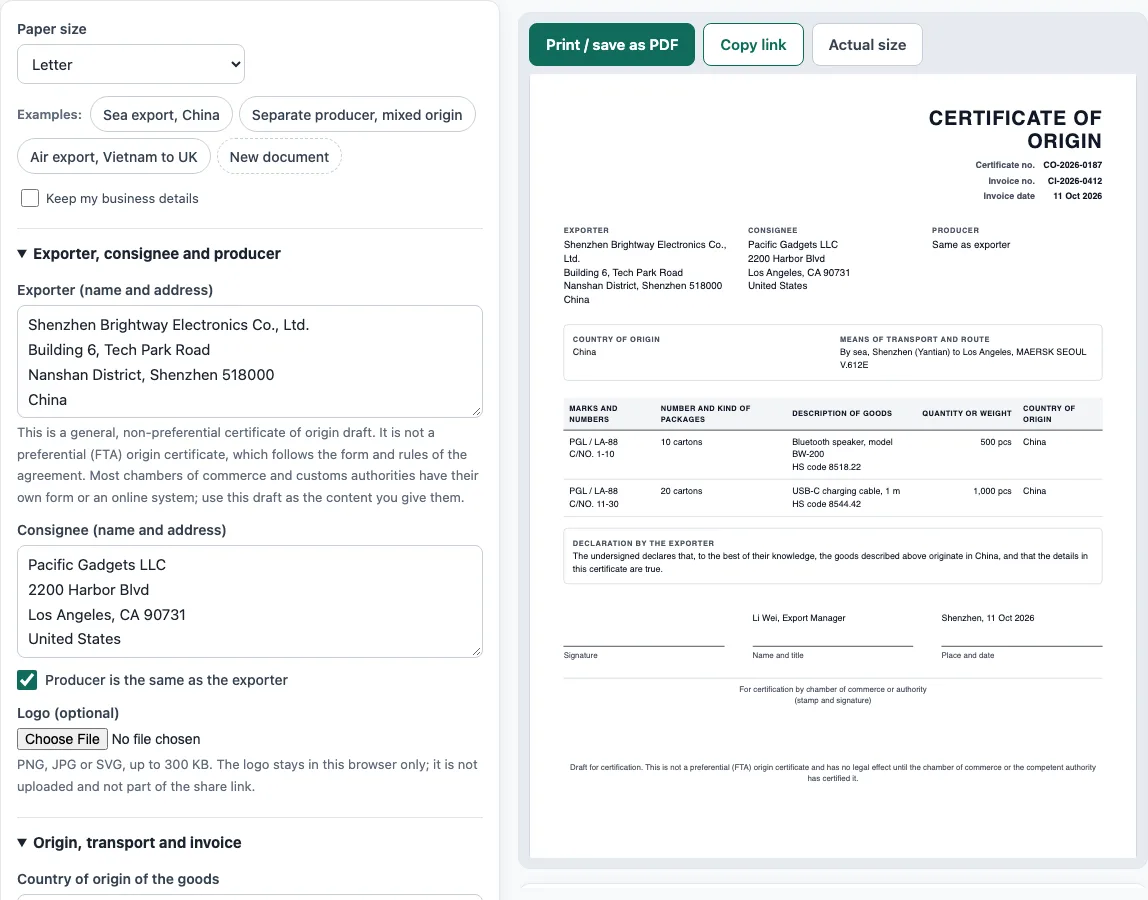
How to use the Certificate of Origin Template
- Choose the paper size (A4 or Letter). To see a filled-in sample first, click one of the “Examples” buttons, such as “Sea export, China”.
- Under Exporter, consignee and producer, enter the Exporter (name and address) and the Consignee (name and address). If someone else made the goods, untick Producer is the same as the exporter and enter the Producer (name and address).
- Under Origin, transport and invoice, enter the Country of origin of the goods, the Means of transport and route, the Certificate no. (optional), the Invoice no. and the Invoice date.
- Under Goods, click Add item for each row. Fill in the description, marks and numbers, number and kind of packages, HS code, quantity or weight, and the Country of origin (this line). Use the move up, move down or remove controls to reorder or delete rows.
- Under Exporter’s declaration, signature and notes, enter the Name of signatory, Title, Place, Date and any Remarks (optional).
- Check the preview and the warnings below it. Fix any missing exporter or consignee details, missing descriptions, or lines without a country of origin.
- Click Print / save as PDF, then choose Save as PDF in the browser’s print dialog.
Tick Keep my business details before clicking New document if you want your own company details kept for the next draft.
What is a certificate of origin?
A certificate of origin (CO) states the country in which goods were obtained, produced or manufactured. Importing countries use it to apply the right duty rate, quotas, trade remedies or bans, and sometimes for statistics.
A typical non-preferential CO lists the exporter, the consignee, the producer if different, the means of transport and route, the marks and numbers of packages, the number and kind of packages, a description of the goods, the HS code, the quantity or weight, the country of origin, and the invoice number and date. It ends with a declaration by the exporter, signed and dated, and often a box where a chamber of commerce or other authority certifies and stamps it.
Country of origin is not the country of shipment. Goods made in one country and shipped through another keep the origin of the country where they were wholly obtained or last substantially transformed, under the rules of the importing country.
Which certificate of origin template do you need?
There are two main kinds. A non-preferential certificate proves origin in general and is often issued or certified by a chamber of commerce. A preferential certificate or origin statement is used under a free trade agreement, such as the USMCA (called CUSMA in Canada) certification of origin, EUR.1 or REX statements. These let the importer claim a lower duty rate, and each has required data elements and rules of origin set by the agreement.
This tool makes a non-preferential draft. It is not a preferential certificate. For a USMCA / CUSMA claim, use the USMCA certificate of origin template; for other agreements, use the form or statement the agreement requires. Many chambers of commerce issue certificates of origin electronically on their own forms, so the draft here is most useful as the content you give them, or as the exporter’s declaration an authority will certify.
Sources
- ICC World Chambers Federation Certificates of Origin Guidelines (2019 revision) — how chambers of commerce issue and certify non-preferential certificates. The field list here is our own summary of the usual layout; preferential forms (USMCA, EUR.1, REX) are not produced here.
Worked examples
| Input | Result |
|---|---|
| 2 lines, origin China | 30 packages |
| 2 lines, origin Italy | 3 packages |
| 1 lines, origin Vietnam | 8 packages |
Calculated by the tool above with these values.
Frequently asked questions
Is this certificate of origin template accepted by customs?
Many customs authorities and chambers of commerce have their own form or online system. Use this draft as the information you provide to them, and confirm which format they require before you submit it.
Can I use this as a USMCA certificate of origin?
No. This tool produces a general, non-preferential draft. USMCA and other free trade agreement certificates have their own required data and rules, so use the official form for that agreement.
Is my information uploaded anywhere?
Nothing you type is uploaded. Everything runs in your browser, and the draft is saved there as you type. Nothing is stored on a server.
What happens if a line has no country of origin?
The country entered under “Country of origin of the goods” is used for every line that has no country of its own. If you leave both empty, the tool shows a warning for that item, and the origin is the point of the certificate, so add it before printing.
I need a letter of origin or statement of origin. Does this work?
Those names are used for different documents. This tool creates a certificate of origin draft with an exporter’s declaration. Check which format your buyer, bank or authority asks for before you use it.
Is a “cert of origin template” the same thing?
Yes. “Cert of origin” is a common short name for a certificate of origin, and this cert of origin template makes the same non-preferential draft described above.
Can I start from a sample?
Yes. Click one of the “Examples” buttons, such as “Air export, Vietnam to UK”, to fill the form with a sample document. Then click New document to clear the form and enter your own details.
Related tools
- Commercial invoice template — the customs invoice for an international shipment.
- Packing list template — cartons, weights and CBM, package by package.
- Proforma invoice template — the pre-shipment invoice with Incoterms, ports and HS codes.
- Bill of lading template — a straight bill of lading for truck shipments.
- Invoice generator — invoices with tax, discounts, shipping, payments and balance due.
- Shipping label generator — address labels for boxes and pallets, numbered 1 of N.
- USMCA certificate of origin template — the nine data elements for a USMCA / CUSMA preference claim.