Invoice Generator
Fill in your business, your customer and the items; the invoice adds up the tax and totals and is ready to print or save as PDF.
Popular tools
- Bill of Sale Template (Car, Boat or Any Item)Enter the seller, buyer, item and price to get a bill of sale with an as-is clause, an ownership statement and signature lines, ready to print or save as PDF.
- Purchase Order Template and GeneratorFill in the vendor, ship-to address and items; the purchase order adds up the totals and prints on A4 or Letter.
- Contractor Invoice Template (Labour and Materials)List your labour and your materials, add a markup on materials and a deposit, and get a contractor invoice with the balance due.
- Bill of Lading Template (Straight BOL Form)Enter the shipment details and lines; the straight bill of lading totals the units and weight and is ready to print and sign.
- Certificate of Origin TemplateEnter the shipment and the goods to get a certificate of origin draft, ready to sign and take to your chamber of commerce.
This free invoice generator lets you create a professional invoice in your browser and print it or save it as a PDF. It works as an online invoice builder and invoice creator, free online with no account and no sign-up: a quick way to create a billing invoice or a simple bill for a customer. Everything runs in your browser, and nothing you type is uploaded to a server. For quotes, orders and export documents, see all calculators and generators.
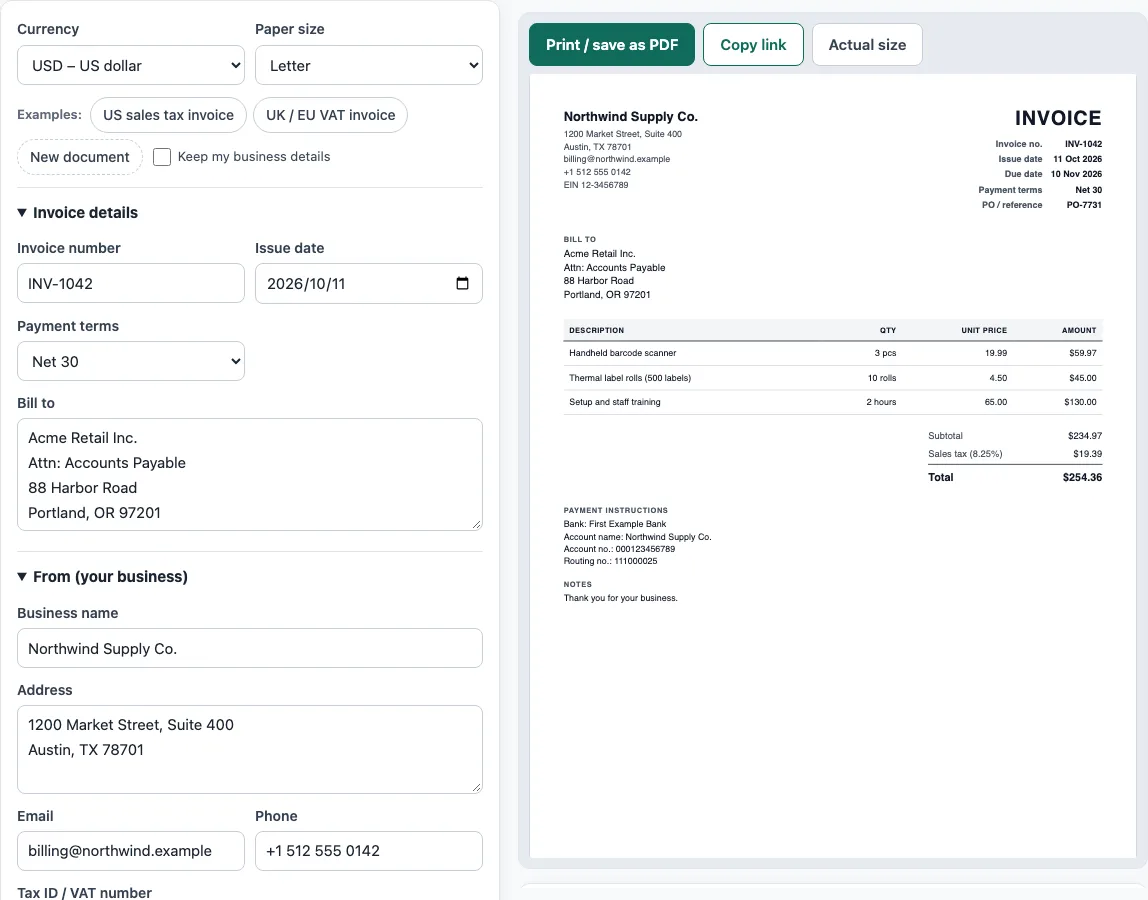
Enter your business details, your customer’s details and the items you sold. A live preview shows the finished document on an A4 or US Letter sheet as you type, and a totals panel works out tax, discounts, shipping and the balance due. You can add your logo as a PNG, JPG or SVG file up to 300 KB.
How to use the Invoice Generator
- Above the form, choose a currency and a paper size (A4 or Letter). To start from a sample, click an Examples button such as ‘US sales tax invoice’ or ‘UK / EU VAT invoice’.
- In ‘Invoice details’, enter an Invoice number and an Issue date. Pick payment terms such as Net 30, or choose Pick a due date and enter a Due date.
- In ‘From (your business)’, enter your Business name, Address, Email, Phone and Tax ID / VAT number.
- In ‘Bill to’, enter who the invoice is for. Fill in Ship to (if different) only if the goods go somewhere else.
- In ‘Items’, click Add item for each product or service. Fill in Description, Qty, Unit, Unit price, Disc. % and Tax %. Move a row up or down, or remove it, with its row controls.
- In ‘Tax, discount and payment’, set the Tax name and Tax rate (%). Add a Discount on the whole invoice or a Shipping amount if needed. Enter any Amount already paid.
- In ‘More details’, add a Document title (INVOICE, TAX INVOICE or your own word), a PO number / reference, Notes and Payment instructions.
- Check the live preview, the Totals panel and any warnings below it. Open ‘How the totals were calculated’ to confirm the numbers.
- Click ‘Print / save as PDF’ and choose Save as PDF in the browser’s print dialog, or click ‘Copy link’ to share the document.
What is an invoice?
An invoice is a document a seller sends to a buyer asking for payment for goods or services. It records who sold what to whom, at what price, and when payment is due. Keeping a clear invoice helps both sides agree on what was owed.
What does a complete invoice include?
A complete invoice usually shows the word “Invoice”, a unique invoice number, and the issue date. It also needs the seller’s name and address (plus a tax ID where required), the customer’s name and address, and a description, quantity and price for each item or service. Finally it lists the subtotal, tax, total, payment terms, due date and how to pay.
How do payment terms and due dates work?
Payment terms set when the money must be paid. “Due on receipt” means payable immediately. “Net 30” means payment is due 30 days after the invoice date, and “Net 15” or “Net 60” work the same way with different day counts. If you need a fixed date instead, choose a specific due date, and make sure it is not before the issue date.
How are invoice totals calculated?
Each line total is the quantity multiplied by the unit price, minus any line discount. The subtotal is the sum of all line totals. Tax is the subtotal after discounts multiplied by the tax rate. The total is the subtotal minus any whole-invoice discount, plus tax and shipping, and the balance due is the total minus the amount already paid.
For example, three items at 19.99 with 8.25% sales tax give a subtotal of 59.97. The tax is 59.97 × 0.0825 = 4.947525, which rounds to 4.95 to the cent. The total is therefore 64.92.
How do US sales tax and UK/EU VAT differ on an invoice?
In the US, sales tax rates are set by states and localities, and there is no federal VAT. In the UK, EU, Australia and many other countries, VAT or GST applies. A VAT invoice must show, among other details, the seller’s VAT number, the VAT rate and the VAT amount (UK: HMRC VAT Notice 700, section 16; EU: Directive 2006/112/EC, Article 226). Set the Tax name to match the local rule, such as Sales tax, VAT or GST.
Why do invoice numbers need to be sequential?
An invoice number identifies one invoice, so each number should be unique. Many tax authorities expect numbers to run in order without gaps, for example INV-2026-001, INV-2026-002. Skipping or reusing numbers makes records hard to check, so the tool warns you if the invoice number is empty.
How long should you keep invoices?
Keep a copy of every invoice you send. Tax authorities expect records to be kept for several years. As of October 2026, the IRS generally says 3 years, with longer periods in some cases, and HMRC VAT Notice 700/21 says VAT records must generally be kept for at least 6 years.
What is the difference between a proforma invoice, a commercial invoice and a receipt?
A proforma invoice is sent before goods ship, as a quote. A commercial invoice goes with an export shipment for customs. A receipt confirms that payment was received, and the rent receipt template makes one for rent payments.
Sources
- HMRC VAT Notice 700, section 16 and EU VAT Directive 2006/112/EC, Article 226 — what a VAT invoice must show.
- IRS: How long should I keep records? and HMRC VAT Notice 700/21 — record retention (checked October 2026).
- ISO 4217 currency list (list one, published 17 September 2026) — currency codes and decimals for all 36 offered currencies.
Worked examples
| Input | Result |
|---|---|
| 3 items in USD, Sales tax | Total $254.36 |
| 3 items in GBP, VAT | Total £2,016.00 |
| 1 items in JPY, Consumption tax | Total ¥35,530 |
| 1 items in USD, no tax | Total $400.00 |
Calculated by the tool above with these values.
Frequently asked questions
Is this invoice generator free?
Yes. It is free to use, and you do not need an account or sign-up.
Is my invoice data uploaded anywhere?
No. Everything runs in your browser and nothing you type is uploaded. The draft is saved only in your browser, and nothing is stored on a server.
Can I add my logo to the invoice?
Yes. Upload a PNG, JPG or SVG logo up to 300 KB. The logo stays in your browser only and is not part of the share link.
How do I save the invoice as a PDF?
Click ‘Print / save as PDF’, then choose Save as PDF in the browser’s print dialog. Pick A4 or US Letter to match the paper size you set in the tool.
Why does the tool say the balance is negative?
The amount already paid is more than the total. Check the Amount already paid field. A negative total is only correct for a credit note.
Can I start from an example?
Yes. Use the ‘US sales tax invoice’ or ‘UK / EU VAT invoice’ buttons to fill the form with a sample document, then replace the details with your own.
Can I use the documents for my business?
Yes. Documents made here may be used for business with no attribution.
Related tools
- Quotation generator — a price quote with a validity date and an acceptance line.
- Purchase order template — a purchase order to send to your supplier.
- Proforma invoice template — the pre-shipment invoice with Incoterms, ports and HS codes.
- Commercial invoice template — the customs invoice for an international shipment.
- Delivery note template — what was delivered, for the customer to sign.
- Packing list template — cartons, weights and CBM, package by package.
- Shipping label generator — address labels for boxes and pallets, numbered 1 of N.
- Invoice number generator — a numbering format and the next invoice numbers.
- Invoice due date calculator — due dates for Net 30, EOM and 2/10 net 30 terms.
- Sales order template — the seller’s order confirmation with deposit and balance due.
- Hourly invoice template — hours times a rate, with billing blocks and expenses.
- Contractor invoice template — labour and materials with a markup and a deposit.
- Rent receipt template — a landlord’s receipt for rent, with the rent period and any balance.
- Bill of sale template — a written record of the sale of a vehicle, boat or other item.
- Statement of account template — a customer statement with a running balance and ageing.